Productivity
Create Recurring Airtable Tasks from Templates
Create scheduled task records from Airtable templates.
Download workflow
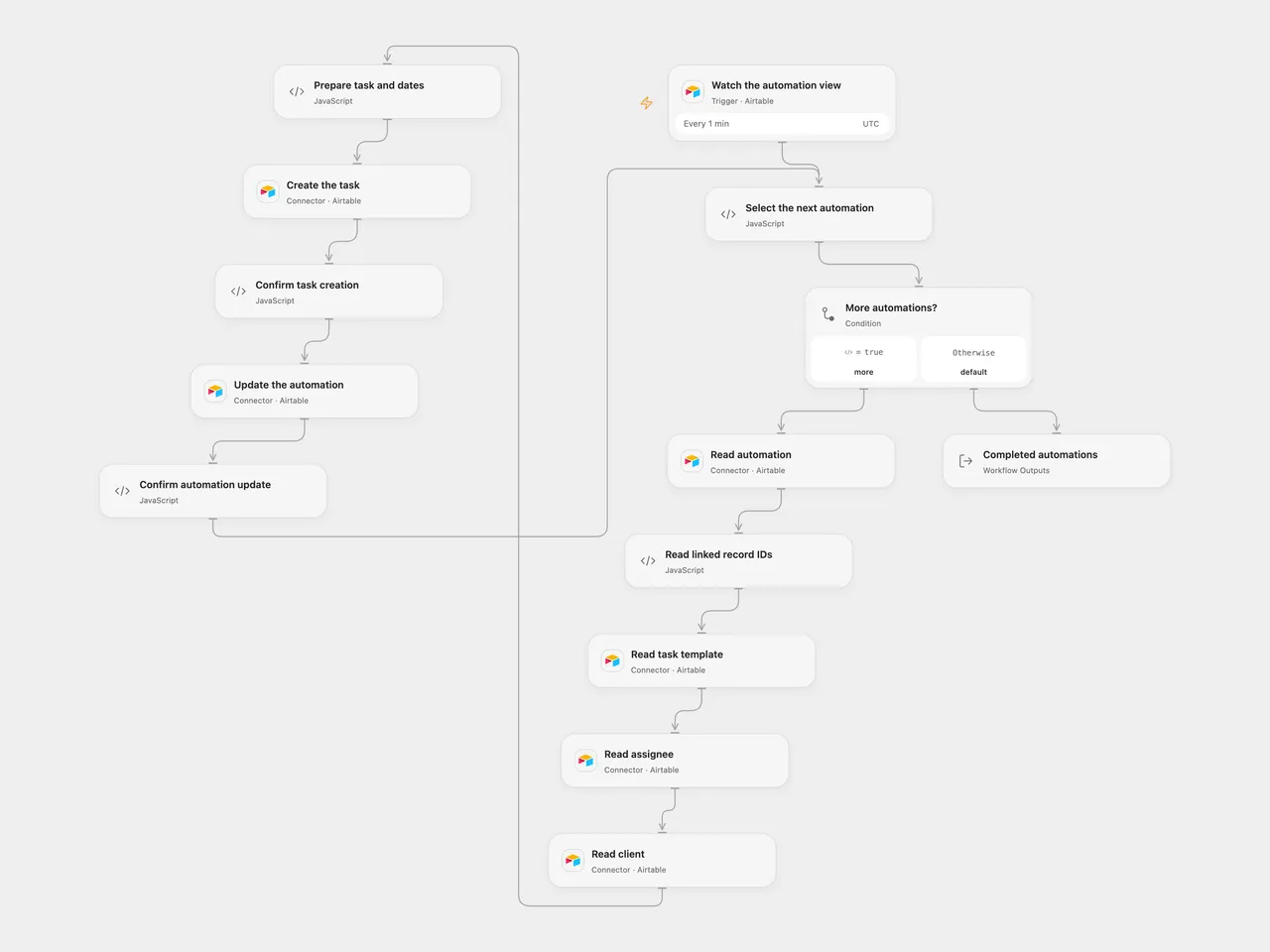
Create task records from Airtable automation templates.
Setup
Connect Airtable. In the Airtable trigger, choose the automation table and the view containing records ready for their first task; configure its Last Modified field named updated_at. Set the same base and the relevant automation, task, template, team and client table IDs in the corresponding Airtable nodes. In n8n, configure the trigger and the Airtable Base ID’s node and connect an Airtable personal access token. Activate one format.
The automation table needs linked-record fields Template, Assigned Team Member, and Client, plus First Task Created, Start Date, Last Task Created, Time Value, Days for Soft Due Date and Next Task Creation Date. The template table needs Template Name and Description. The task table needs Status, Task Name, Task Description, Kickoff Date, Soft Due Date, Hard Due Date, Assignee, Template and Client. Match linked-field types to the chosen tables. The first-task field must accept the string true.
Behavior
Each minute, a changed record in the selected view supplies linked template, team member and client IDs. The workflow creates one task using those records and calculates kickoff, soft and hard dates in UTC, then updates the automation record. It uses the first linked item in each field. Missing data or invalid dates stop before task creation. Open Flow starts polling with an initial baseline; changes observed during initial setup may not be emitted. Schedule activation and field visibility affect polling.
A failed or uncertain create or update stops processing. A task may already exist when its response is lost; check Airtable before retrying. Completed writes are not rolled back. Avoid overlapping runs for the same automation. The selected view should exclude completed automations to avoid repeated creation. Poll batches must fit runtime limits.
Inspiration & credits
Changes to the source
- Replace private base, table and view IDs. The source Slack notification node was disabled and is omitted.
- Use UTC calendar dates, validate linked records before writing, and retain each event’s associated records. The source depended on instance local dates and used the first item in several expressions.
Adapted from Recurring tasks automation in Zie619/n8n-workflows. The source export does not identify a separate template author or license.
The collection’s MIT notice is pinned at a later revision. This is the collection notice at that revision; it does not establish a separate original template author’s license. Our changes are listed above; see repository licensing.
MIT License
Copyright (c) 2025 Zie619
Permission is hereby granted, free of charge, to any person obtaining a copy of this software and associated documentation files (the “Software”), to deal in the Software without restriction, including without limitation the rights to use, copy, modify, merge, publish, distribute, sublicense, and/or sell copies of the Software, and to permit persons to whom the Software is furnished to do so, subject to the following conditions:
The above copyright notice and this permission notice shall be included in all copies or substantial portions of the Software.
THE SOFTWARE IS PROVIDED “AS IS”, WITHOUT WARRANTY OF ANY KIND, EXPRESS OR IMPLIED, INCLUDING BUT NOT LIMITED TO THE WARRANTIES OF MERCHANTABILITY, FITNESS FOR A PARTICULAR PURPOSE AND NONINFRINGEMENT. IN NO EVENT SHALL THE AUTHORS OR COPYRIGHT HOLDERS BE LIABLE FOR ANY CLAIM, DAMAGES OR OTHER LIABILITY, WHETHER IN AN ACTION OF CONTRACT, TORT OR OTHERWISE, ARISING FROM, OUT OF OR IN CONNECTION WITH THE SOFTWARE OR THE USE OR OTHER DEALINGS IN THE SOFTWARE.