Sales
LeadPilot Cold Email Drafts
Write personalized cold-email and follow-up drafts for every supplied lead, then save the complete batch in Google Sheets for review.
Download workflow
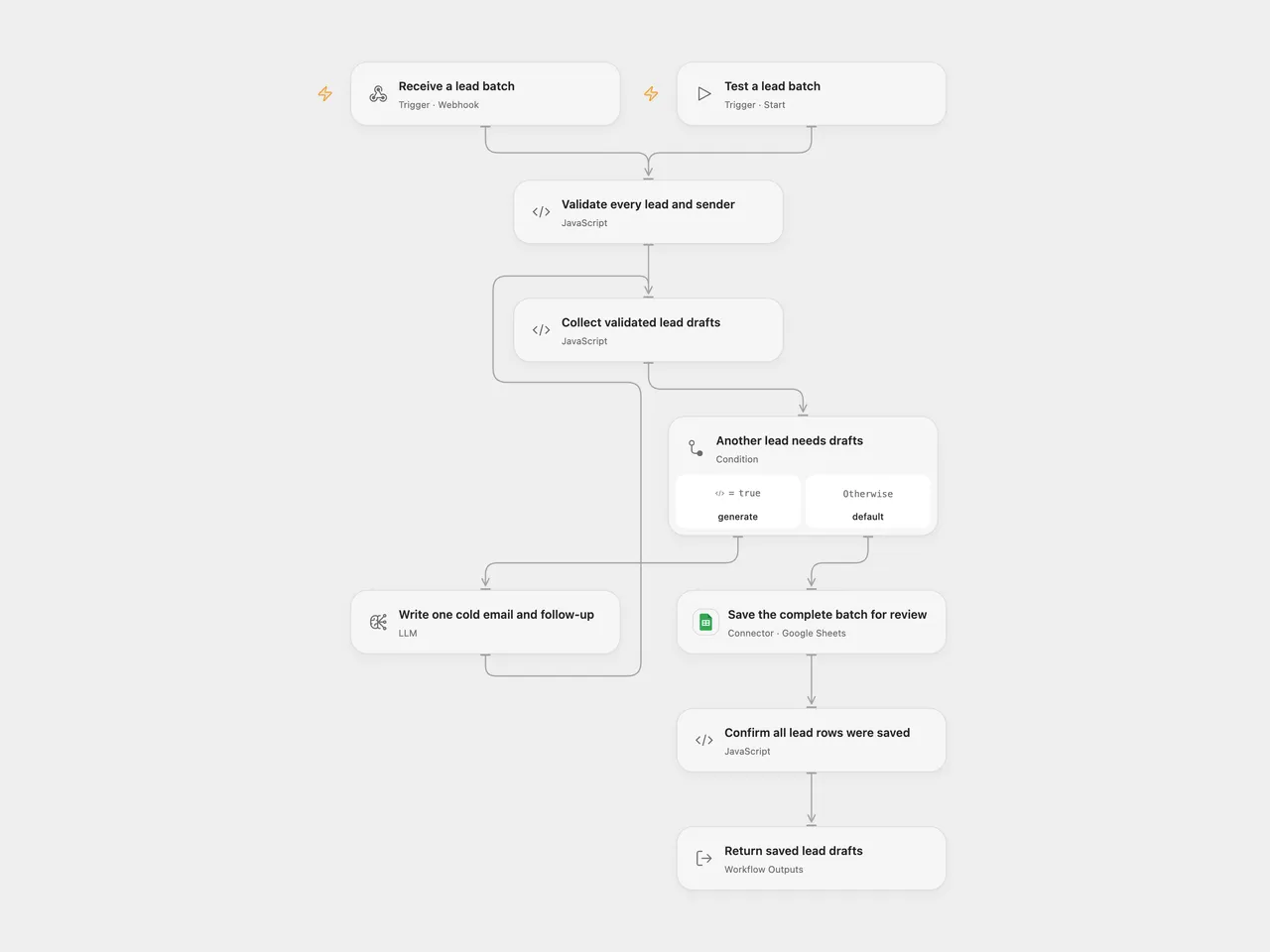
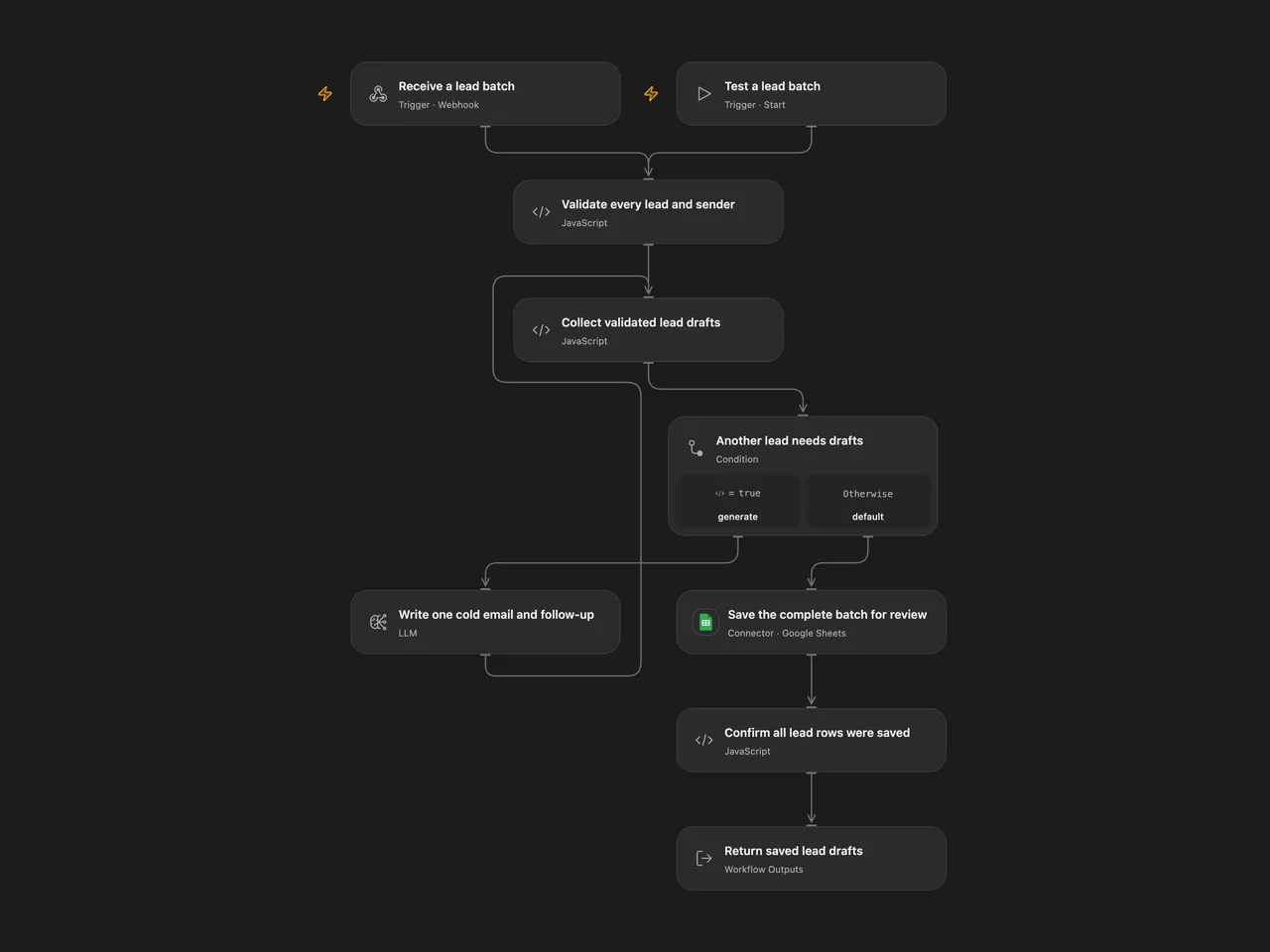
Supply a lead list and sender brief. Generate a personalized cold email and a follow-up for every lead, and save the complete batch in Google Sheets for review before sending.
Configure
Create a Lite Pipeline sheet with these headers in order: Name, Email, Title, Company, Subject Line, Email Body, Follow-up, Generated At, Sent. Select your Google Sheets account and spreadsheet on the save node. The template appends one row per lead with Sent set to No; it does not send email or change that flag later. Follow-up stores the follow-up body. The follow-up subject is retained in the returned draft object.
Configure the generation node with the source model, gpt-4o-mini, temperature 0.7, an 800-token output budget and JSON object mode. Open Flow uses its native LLM node to retain these generation settings and its per-lead retry boundary. Its model service must expose that route. n8n uses its native LLM Chain and OpenAI Chat Model with OpenAI credentials; the adapter’s internal retries are disabled so they do not multiply the workflow allowance. OpenAI’s model page currently lists gpt-4o-mini-2024-07-18 as this alias’s default snapshot. Its deprecation notice names that snapshot for shutdown on January 14, 2027. Recheck your service’s alias routing and update/test the generation settings before that date; a provider’s alias can change. Model availability depends on your service/account. Both inspected adapters send max_tokens: 800 and JSON object mode. Open Flow adds a JSON instruction before the source system prompt. Generated wording can differ.
Protect the published POST webhook using your deployment’s access controls. This template does not add caller authentication. Send a lead object directly or a leads array with sender settings:
{
  "leads": [
    {"name": "Alex", "email": "alex@example.com", "title": "Operations Lead", "company": "Example Co", "industry": "Services", "company_description": "A distributed service team", "notes": "Reviewing manual reporting"}
  ],
  "sender_name": "Sam",
  "sender_company": "Example Automation",
  "value_prop": "We help operations teams automate weekly reporting.",
  "calendar_link": "https://example.com/book"
}
Every lead needs a nonempty name; other fields are optional text. linkedin_url is retained with the lead but is not scraped or added to the source writing prompt. Sender defaults are Your Name, Your Company and We help companies save time with automation.; supply your real sender brief in each request. There is no environment-variable dependency. Open Flow also provides a manual test entry accepting the same request object.
Run and review
The workflow validates the entire input, generates drafts sequentially for every lead, validates every subject/body and follow-up subject/body, then appends the complete batch once. A later generation failure prevents the whole batch from being saved. No lead is silently skipped or truncated. Review the saved copy before sending it yourself. The prompt asks for a 3–7 word subject, a 50–80 word email and a 30–50 word follow-up for three days later; these are model instructions, not deterministic length checks or a scheduled send.
Generation allows up to three attempts per lead with two-second gaps. Open Flow retries transient HTTP429/5xx failures; fatal authentication/configuration errors stop immediately. n8n’s node retry also retries ordinary errors. Malformed JSON can use the same three-attempt generation allowance. A valid JSON object with missing or empty required copy stops without another generation request. Earlier successful generations are retained during a later lead’s retry. Both formats send one Google Sheets API append containing every row. This is a batch write, with no workflow transaction or rollback covering generation and saving. The Sheet append has no workflow retry or deduplication. A lost response can leave rows saved, so inspect the sheet before repeating a request. Literal text is stored with RAW, including text beginning with =.
Success is returned after the append completes. The result includes the first lead’s original response fields, count, the complete associated drafts array and a review reminder. Open Flow additionally checks the returned updated row count and includes updatedRange; n8n’s native append returns mapped row objects rather than that API receipt. A successful response confirms the append operation, not email delivery or copy quality.
The source suggests small lists of 5–20 leads without enforcing a fixed cap. Choose a batch that completes within your deployment’s webhook window. Open Flow waits up to 60 seconds for the final response; a timeout is not proof that processing or writing stopped. Do not automatically resubmit. Complete collections must fit model context and platform limits, including 1 MiB per Code input/result in the inspected Open Flow host. Oversized input fails without a partial output. Your lead details and sender brief are sent to your selected model service and Google Sheets.
Changes to the source
- Replace the incompatible OpenAI node type/version with a native Chain/Chat Model, configure its supported model/JSON/token-budget fields and parse JSON within the generation attempt.
- Remove an unused UUID module dependency, validate every lead and preserve each lead’s association through generation and saving.
- Validate the complete generated batch, save before responding, and return every draft rather than only the first item.
- Retry only the current lead’s generation and remove automatic Sheet-write replay after an unknown outcome.
- Store literal text with
RAWand make sender/spreadsheet configuration explicit.
Adapted from LeadPilot Lite - AI Cold Email Writer in enescingoz/awesome-n8n-templates.
Source collection notice: © 2024–2026 Enes Cingoz, CC BY 4.0. The source export does not identify a separate template author or license. See repository licensing for the scope of OOMOL contributions and third-party material.