Developer Tools
Publish New GitLab Releases to Outline
Publish an Outline document when a GitLab release is created.
Download workflow
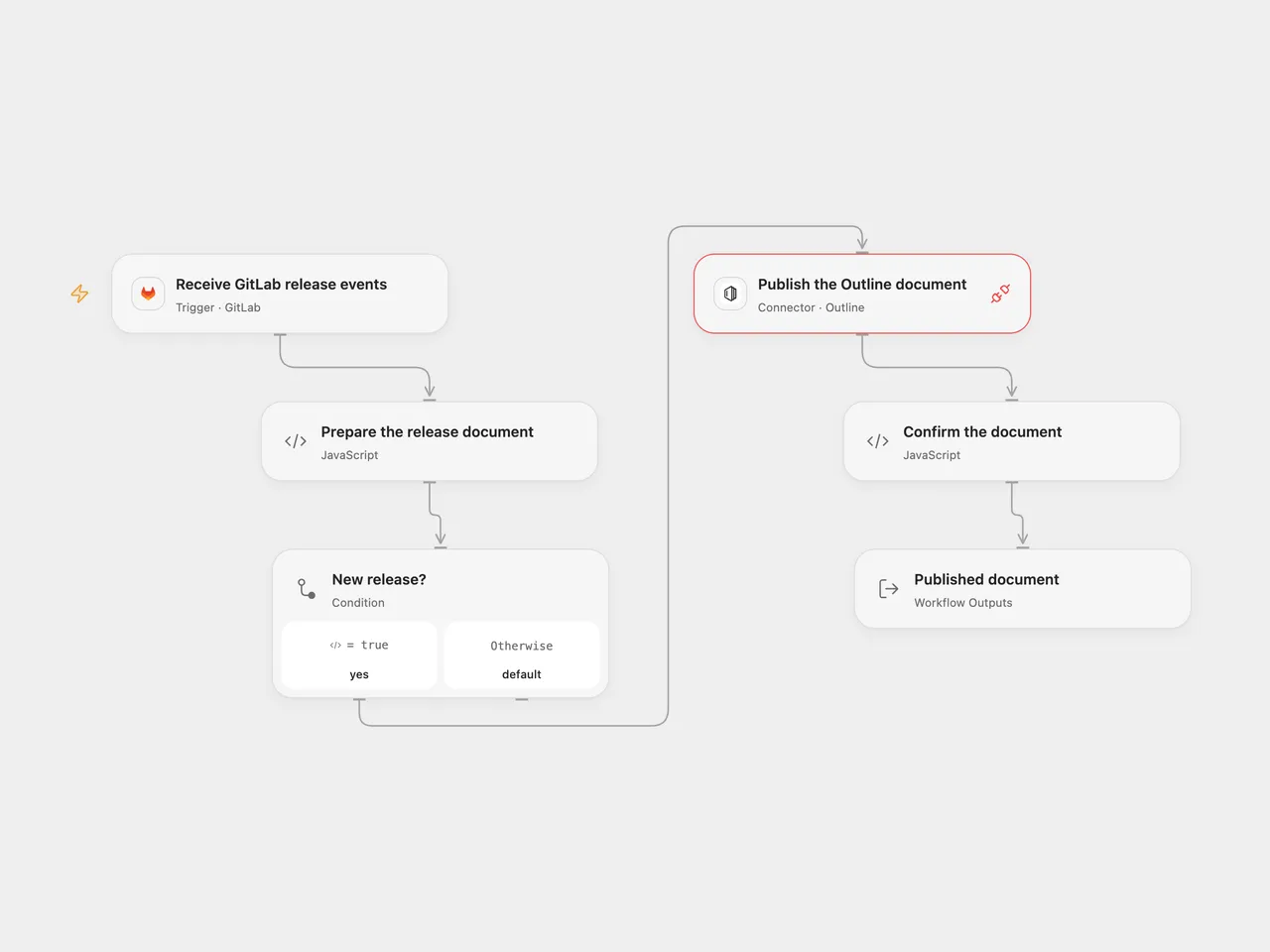
Publish an Outline document when a GitLab release is created.
Setup
Connect GitLab in Receive GitLab release events, set the project path and deploy the public HTTPS callback. The GitLab account must be allowed to manage project webhooks. Connect Outline in Publish the Outline document with an API key allowed to create and publish documents. Set the collection ID and, if needed, the parent document ID in Prepare the release document.
In n8n set the GitLab owner and project in GitLab Trigger, connect GitLab, and configure a Header Auth credential with Authorization: Bearer YOUR_OUTLINE_API_KEY in Publish the Outline document. Enter the same Outline IDs in Prepare the release document. Leave the parent ID empty to publish at the collection root. Activate one format. After each n8n webhook registration, enable SSL verification for that webhook in GitLab: the native n8n node registers it disabled. Use a newly registered webhook so n8n stores its verification secret; an older registration without that secret may accept unsigned requests.
Behavior
Each GitLab release creation publishes a new Outline document titled “Release” followed by the release name. The body contains its description and a link to the release. A missing description becomes empty. Release updates and deletions do not change the document. Repeated deliveries can create duplicates. Check Outline before retrying a failed or uncertain write. The webhook acknowledgment confirms receipt, not publication. Open Flow verifies the GitLab token and uses the delivery ID for deduplication when supplied; n8n verifies its stored token for newly registered webhooks but does not add the same delivery deduplication.
Inspiration & credits
Changes to the source
- Subscribe to release events and select creations: the original subscribed to tag pushes while filtering for release payloads, while the original listing describes new releases. Replace private project and document IDs with setup.
- Use the Outline Connection Proxy in Open Flow because the current Outline Actions do not create documents, and check the returned document ID.
Adapted from GitLab releases to Outline in Zie619/n8n-workflows. The matching n8n listing credits Manu. The original template does not state a separate license.
The collection’s MIT notice is pinned at a later revision. This is the collection notice at that revision; it does not establish a separate original template author’s license. Our changes are listed above; see repository licensing.
MIT License
Copyright (c) 2025 Zie619
Permission is hereby granted, free of charge, to any person obtaining a copy of this software and associated documentation files (the “Software”), to deal in the Software without restriction, including without limitation the rights to use, copy, modify, merge, publish, distribute, sublicense, and/or sell copies of the Software, and to permit persons to whom the Software is furnished to do so, subject to the following conditions:
The above copyright notice and this permission notice shall be included in all copies or substantial portions of the Software.
THE SOFTWARE IS PROVIDED “AS IS”, WITHOUT WARRANTY OF ANY KIND, EXPRESS OR IMPLIED, INCLUDING BUT NOT LIMITED TO THE WARRANTIES OF MERCHANTABILITY, FITNESS FOR A PARTICULAR PURPOSE AND NONINFRINGEMENT. IN NO EVENT SHALL THE AUTHORS OR COPYRIGHT HOLDERS BE LIABLE FOR ANY CLAIM, DAMAGES OR OTHER LIABILITY, WHETHER IN AN ACTION OF CONTRACT, TORT OR OTHERWISE, ARISING FROM, OUT OF OR IN CONNECTION WITH THE SOFTWARE OR THE USE OR OTHER DEALINGS IN THE SOFTWARE.