开发者工具
API Operations Schema Export
Group a service’s API operation rows from Google Sheets into a custom JSON catalog and save the export in Google Drive.
下载工作流
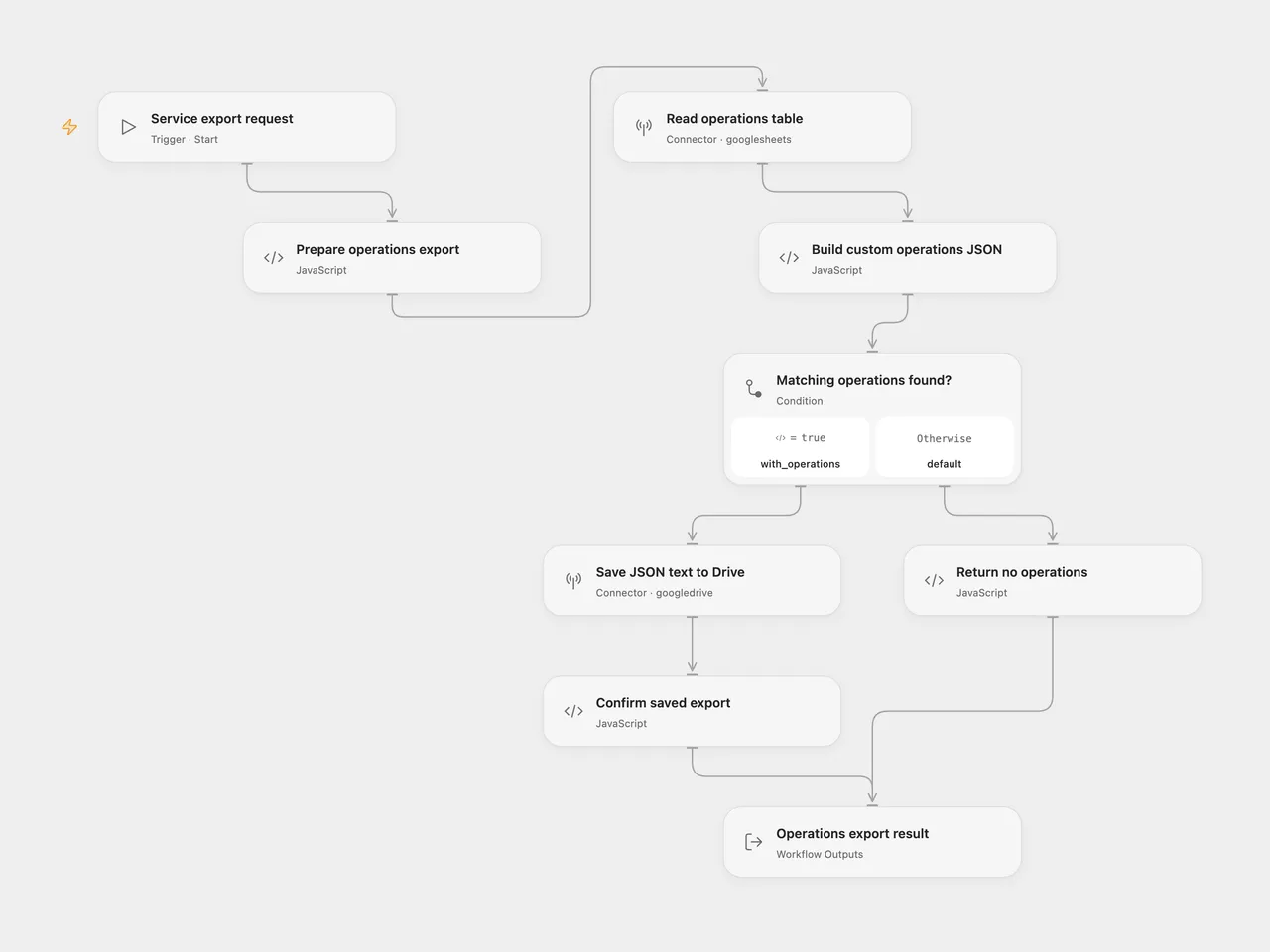
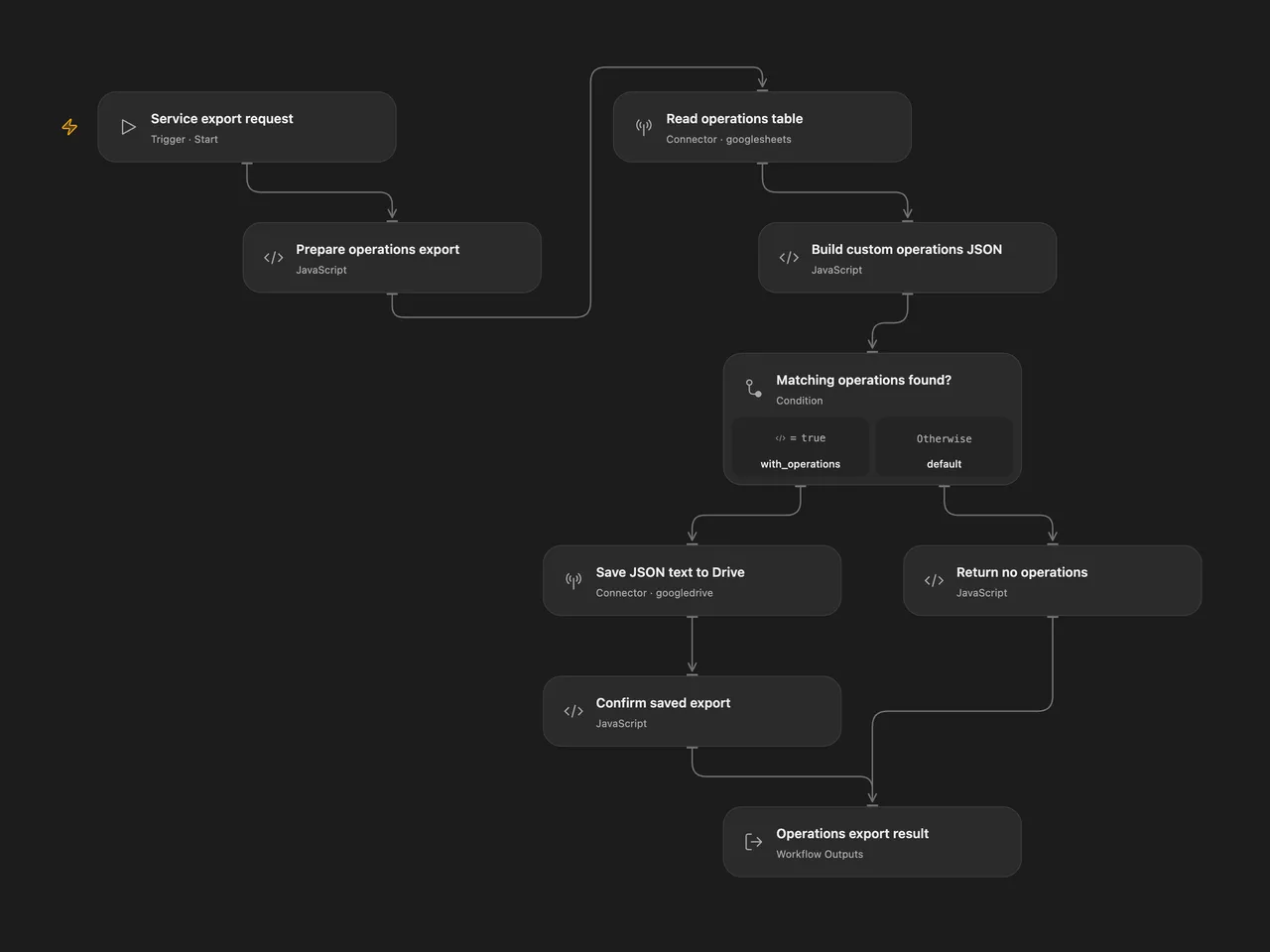
Group one service’s API operation rows from Google Sheets into a custom JSON catalog and save the export in Google Drive.
Setup and use
Connect Google Sheets in Read operations table and Google Drive in Save JSON text to Drive. In Prepare operations export, set your spreadsheet ID and the complete tab as a quoted A1 sheet name, such as 'Operations'. The account needs read access to the table and permission to create Drive files.
The first nonempty table row must contain unique text headers with these exact column names:
| Column | Content |
|---|---|
service |
Service name to match exactly |
resource |
Resource or endpoint group, such as Users API |
operation |
Operation name, such as list users |
description |
Description text; its first sentence is used |
url |
API endpoint URL or path |
method |
HTTP method, such as get |
documentation_url |
Optional documentation link for that operation |
In Open Flow, use Run with:
{"service":"Example Service","url":"https://example.com/docs"}For n8n, select Google Sheets OAuth2 and Google Drive credentials on their request/upload nodes. Configure Operations Sheet Settings and edit Service To Export, then run Run Operations Export. The callable trigger accepts the same flat input or the source’s {"eventType":"generate","data":{"service":"Example Service","url":"https://example.com/docs"}} shape.
Result
The exported JSON retains the source’s custom structure:
{
    "documentation_url": "https://example.com/docs",
    "endpoints": [
        {
            "resource": "Users",
            "operations": [
                {
                    "operation": "List users",
                    "description": "List users.",
                    "ApiUrl": "/v1/users",
                    "method": "GET",
                    "method_documentation_url": ""
                }
            ]
        }
    ]
}
This is a custom operations catalog. It does not implement the OpenAPI specification or the JSON Schema vocabulary. The workflow exports existing operation rows; it does not discover APIs or generate missing operations.
Service matching is case-sensitive. Resource grouping ignores case, trims surrounding whitespace and removes the standalone word API; it keeps words such as Capital intact. Groups and operations retain their first-seen sheet order. Descriptions keep their first sentence, and methods become uppercase. Duplicate operation rows remain in the export.
Files use a sanitized service prefix, a UTC run-start timestamp and the .json extension. The JSON text is stored with text/plain, matching the source. The default destination is My Drive’s root; choose a parent folder on the upload node to change it. A successful result is {"exported":true,"response":{"id":"...","filename":"...json"}}.
No matching operations return exported: false with null id and filename, without creating a file. Empty tables also return that result. Invalid matching rows, invalid headers, generated JSON text above 5,000,000 UTF-8 bytes, failed reads/uploads or a missing Drive acknowledgment stop the run. The complete configured tab is read without a fixed row cutoff. Blank rows are skipped and missing trailing cells become empty strings.
Each successful run creates a new Drive file. There is no overwrite, duplicate-export check or workflow-level retry. Native n8n Create from Text performs the upload and a metadata update; failure after upload can leave a file behind. Check Drive before repeating an interrupted run.
Changes to the source
- Extract the independently callable
generatebranch and remove source spreadsheet/folder identities and credentials. - Keep the custom JSON keys and grouping order, while preserving every matching operation from the complete tab.
- Handle no matches explicitly and validate table headers and required operation fields before uploading.
- Keep
APIremoval to complete words, support blank descriptions and sanitize the full filename prefix. - Merge groups after resource-name normalization, so
UsersandUsers APIshare one endpoint group. - Use an explicit UTC timestamp and add a manual n8n entry while accepting the original generate-request shape.
Adapted from Stage 3’s generate sub-workflow in API Schema Extractor in enescingoz/awesome-n8n-templates. This template publishes the operations-export component. The source’s research, scraping, embedding and extraction stages are separate.
Source collection notice: © 2024–2026 Enes Cingoz, CC BY 4.0. The source export does not identify a separate template author or license. This adaptation includes the changes above; see repository licensing for OOMOL contributions and third-party material.