运营
Form Testimonial Capture
Analyze submitted feedback and create a Strapi entry only when its sentiment score is greater than 0.4.
下载工作流
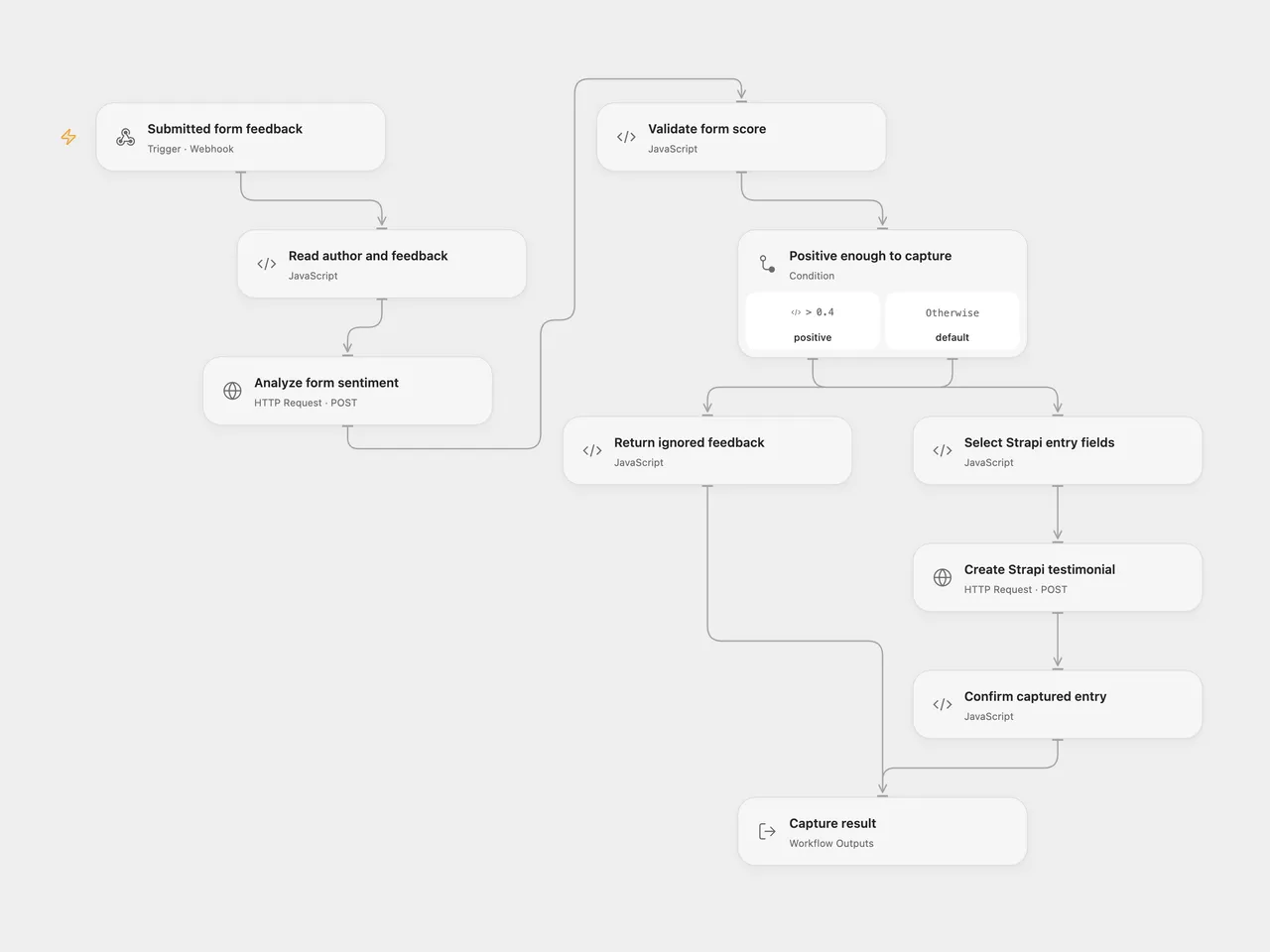
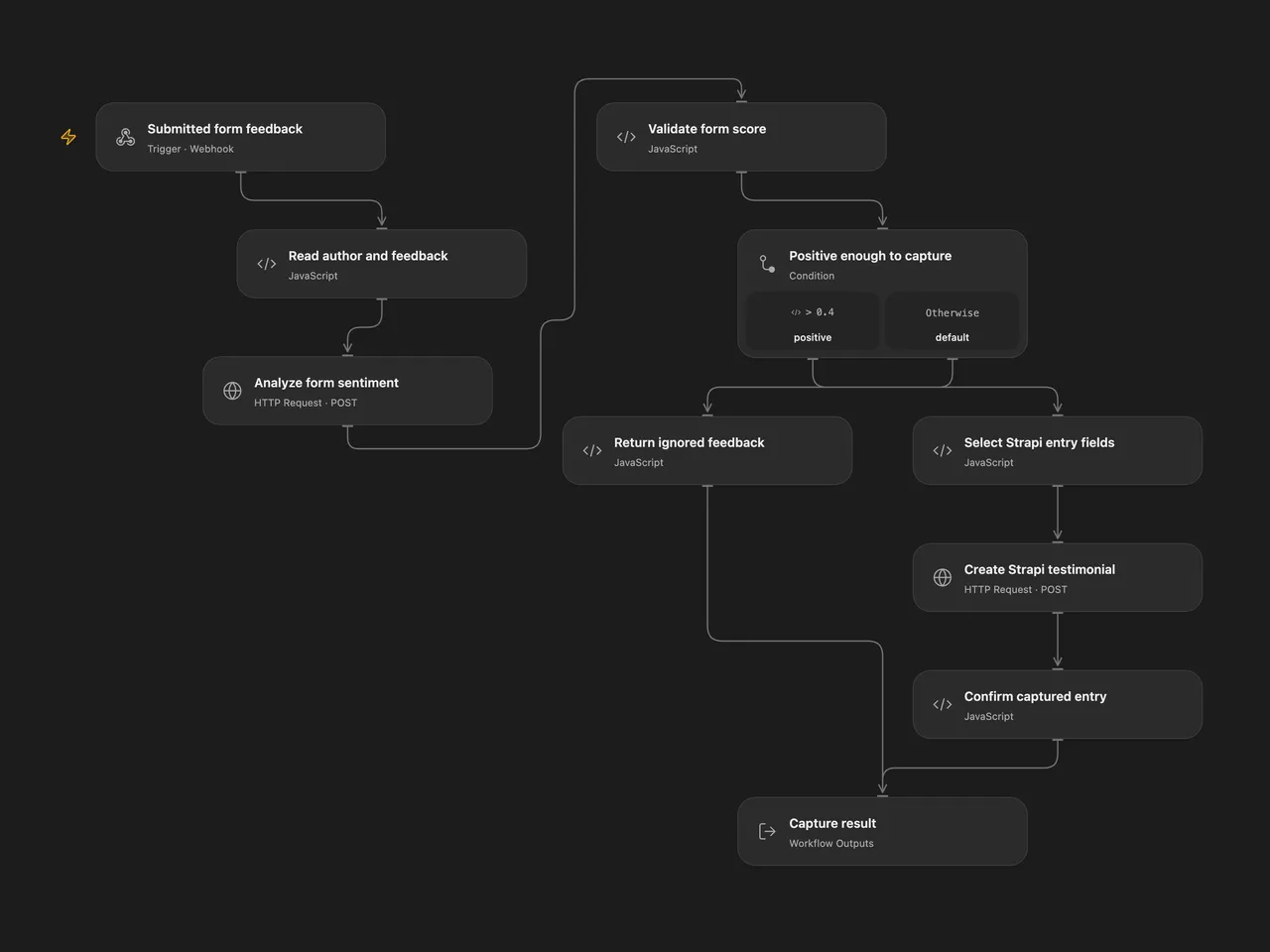
Save positive form feedback as a Strapi entry. Google Cloud Natural Language analyzes the submitted text, and only scores greater than 0.4 create an entry.
Setup
Create a Strapi 5 collection with plural API ID posts and fields Content (text), Author (text), Created (date-time), and URL (optional text). Use an API token allowed to create entries. The create request uses Strapi’s default publication behavior. In Strapi 5, a create without a status parameter publishes immediately when Draft & Publish is enabled. Connect the collection only when positive submissions may be published under those settings.
In Open Flow, set Create Strapi testimonial to the direct HTTPS REST endpoint for your collection, for example https://cms.example.com/api/posts. It must accept the request directly without a redirect. Select a secret Variable containing the Strapi token in its Bearer authentication input. On Analyze form sentiment, select a secret Variable containing a Google Cloud API key. Enable Cloud Natural Language and billing in that Google Cloud project; restrict the key to that API.
In n8n, choose the Google Cloud Natural Language OAuth2 credential. On Store Form Submission in Strapi, select API Token authentication and a Strapi API Token credential with the instance base URL. Choose API Version 4 in that credential: this mode sends the /api/posts endpoint and {data: ...} create envelope used by the current Strapi REST API. The template sends only scalar entry fields and does not use version-specific relation or update operations.
Publish and enable the workflow, then configure your form to POST JSON to its webhook. Put author first and feedback second in data.fields, as in the source form:
{
  "data": {
    "fields": [
      { "value": "Ada" },
      { "value": "The event helped our team solve a recurring problem." }
    ]
  }
}
Behavior
The webhook acknowledges receipt with HTTP 200. The execution analyzes the exact feedback text using Google Cloud Natural Language v1 with automatic language detection. A score greater than 0.4 creates one entry with the submitted author, feedback, a UTC receipt timestamp, and an empty source URL. A score equal to or below 0.4 writes nothing.
Execution output has status: captured with the created entry or status: ignored with no entry, plus the score. The immediate webhook acknowledgment does not confirm that storage succeeded. Invalid input, failed sentiment analysis, or a failed or unconfirmed Strapi write stops the execution. No workflow-level retries or duplicate-submission checks are configured. Inspect Strapi before rerunning an uncertain write.
Feedback is sent to Google. Captured feedback and the submitted author are sent to Strapi. Use the score as a sorting signal and review testimonials before reuse.
Changes to the source
- Adapt the independent form-submission component. The source’s separate scheduled X search is not part of this template.
- Validate the author and feedback fields and keep their values available after sentiment analysis.
- Select only
Content,Author,Created, andURLbefore the Strapi write, so sentiment fields do not become unknown collection properties. - Use supported API-key authentication for Google in Open Flow and the native Google OAuth2 credential in n8n.
- Use the current Strapi REST create envelope and API-token authentication in both formats.
- Confirm the returned Strapi entry and provide explicit captured or ignored execution results.
Adapted from Automate testimonials in Strapi with n8n in enescingoz/awesome-n8n-templates.
Source collection notice: © 2024–2026 Enes Cingoz, CC BY 4.0. The source export does not identify a separate template author or license. See repository licensing for the scope of OOMOL contributions and third-party material.