Files
Route Matching Gmail PDFs to Drive
Classify PDF attachments from Gmail by their content and upload matching files to Google Drive.
下载工作流
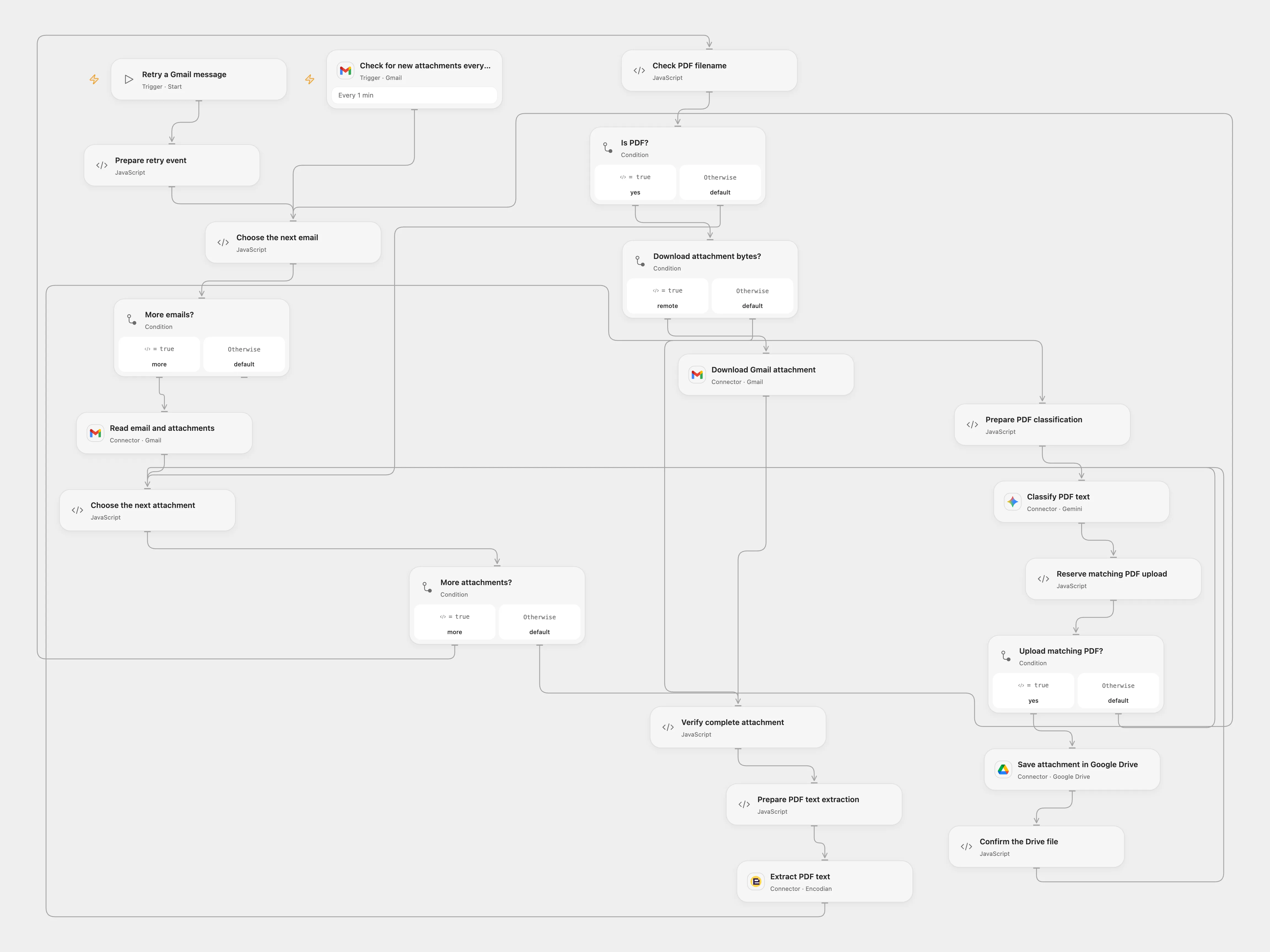
Classify PDF attachments from Gmail by their content and upload matching files to Google Drive.
Setup
Connect Gmail, Encodian, Gemini and Google Drive. Set the destination folder ID in Choose the next attachment and the matching term in Prepare PDF classification. Configure Gmail file transit and replace the example hostname in Verify complete attachment with your transit hostname. Enable persistent State.
Behavior
The workflow polls Gmail every minute, downloads each PDF attachment, extracts its text layer via Encodian, classifies it with Gemini, and uploads matching original PDFs to Google Drive. Non-PDF attachments are skipped.
In n8n
Import the n8n workflow, connect Gmail, OpenAI and Google Drive, set the matching term and Drive folder ID in Configure, and activate the trigger.
Inspiration & credits
Adapted from Send specific PDF attachments from Gmail to Google Drive using OpenAI in enescingoz/awesome-n8n-templates.
Source collection notice: © 2024–2026 Enes Cingoz, CC BY 4.0. The source credits David Sha. See repository licensing for the scope of OOMOL contributions and third-party material.