將 Microsoft Teams 連接至 Open Flow
Ask your AI assistant to extract decisions from a channel, recap a chat, or send an update to the right conversation.
每月 20,000 次免費應用程式呼叫(付費服務另計)
應用程式介紹和工具詳情以英文提供。
可以做什麼
Microsoft Teams brings team channels and chats together. Connect your work or school account to read conversations you can access and send messages with your instructions.
Find Teams and Conversations
List joined teams, their accessible channels, and existing chats.
Read Discussion Messages
Read channel posts with replies and messages from existing chats.
Post and Reply
Send channel posts, reply to an existing channel thread, or message an existing chat.
使用 Microsoft Teams 的範本
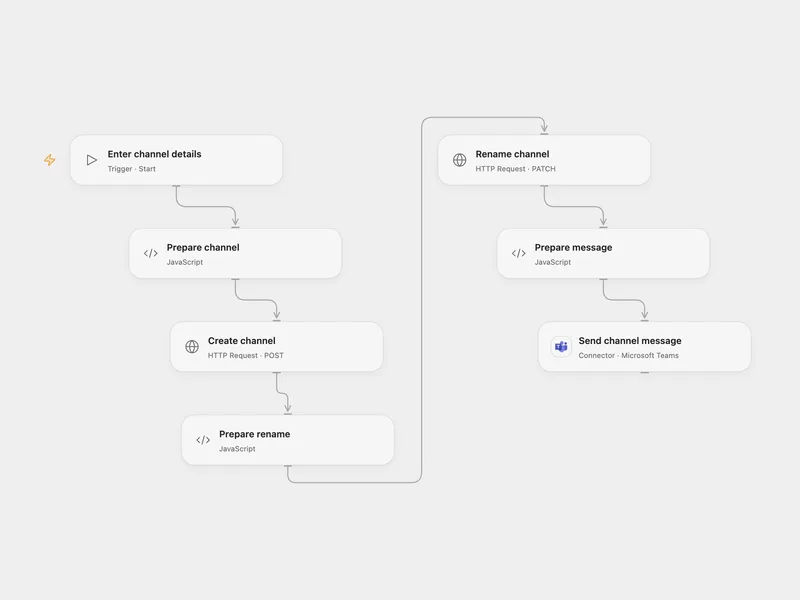
所有工具
Get Current User
Get the profile for the connected Microsoft work or school account.
microsoft_teams.get_current_userList Joined Teams
List teams that the connected account has joined.
microsoft_teams.list_joined_teamsGet Team
Get one Microsoft team by ID.
microsoft_teams.get_teamList Team Channels
List channels visible to the connected account in a team.
microsoft_teams.list_team_channelsGet Channel
Get one channel in a Microsoft team.
microsoft_teams.get_channelList Channel Messages
List channel posts with optionally expanded replies, or continue root-message or reply pagination.
microsoft_teams.list_channel_messagesList Chats
List chats that include the connected account.
microsoft_teams.list_chatsList Chat Messages
List messages from an existing one-on-one, group, or meeting chat.
microsoft_teams.list_chat_messagesSend Channel Message
Send a new root message to a Microsoft Teams channel.
microsoft_teams.send_channel_messageReply To Channel Message
Reply to an existing root message in a Microsoft Teams channel.
microsoft_teams.reply_to_channel_messageSend Chat Message
Send a message to an existing one-on-one, group, or meeting chat.
microsoft_teams.send_chat_message沒有符合搜尋條件的工具。
將 Microsoft Teams 連接至 Open Flow
每月 20,000 次免費應用程式呼叫(付費服務另計)