效率
Telegram Journal Replies to Google Sheets
Save a specified user’s reply to a bot’s dated journal prompt as an entry in Google Sheets.
下載工作流程
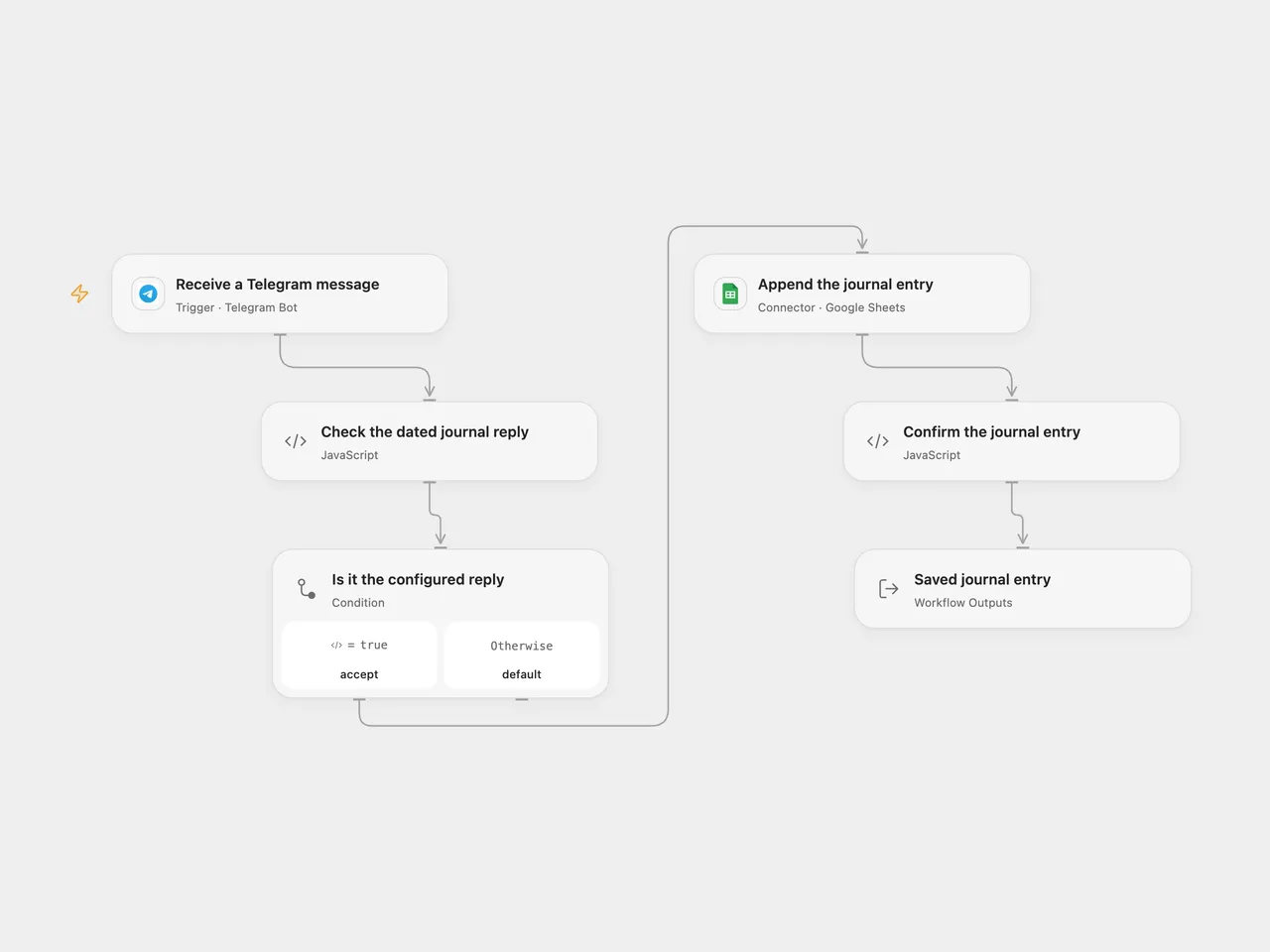
Save a user’s reply to a bot’s dated journal prompt as a row in Google Sheets.
Setup
Connect your Telegram bot in Receive a Telegram message, deploy a public HTTPS callback and activate the workflow. Set the bot and user usernames without @ in Check the dated journal reply. Both accounts must have usernames, and the bot must receive the user’s reply in the chosen chat.
Connect Google Sheets in Append the journal entry, set the spreadsheet ID and A1 range, and place entry and date headers in that order. In n8n, select Telegram and Google Sheets OAuth2 credentials, set the same usernames in Check the dated journal reply, and configure the sheet and range in Add entry to sheet. Activate only one format for the bot webhook.
Behavior
Reply to a message from the configured bot with a text entry. The bot’s prompt must contain a colon followed by the date, for example What did you do: 2026-11-10. The workflow takes the text after the first colon up to any next colon, removes whitespace and saves that value as date; the reply text becomes entry. It does not validate the date or send a reminder. This can be paired with Telegram Journal Reminder.
Other users, non-replies and non-text messages are ignored. A matching reply with a malformed bot prompt fails before writing. Usernames are Telegram profile fields and can change; restrict the bot and sheet to people who should access journal entries. Google Sheets receives values as RAW text. A failed or uncertain append may already have written a row; inspect the sheet before replaying. Open Flow uses Telegram update IDs to help deduplicate webhook admission; the native n8n trigger does not add that same key. Neither format guarantees exactly-once sheet writes or automatic failed-run replay.
Changes to the source
- Make bot/user setup explicit and ignore unrelated updates before reading reply fields.
- Preserve the original colon-based date extraction and entry text, and append only matching replies.
- Use a secret-checked Telegram trigger version and replace private spreadsheet/credential identifiers.
Adapted from Save Telegram reply to journal spreadsheet in Zie619/n8n-workflows. The source export does not identify a separate template author or license.
The collection’s MIT notice is pinned at a later revision. This is the collection notice at that revision; it does not establish a separate original template author’s license. Our changes are listed above; see repository licensing.
MIT License
Copyright (c) 2025 Zie619
Permission is hereby granted, free of charge, to any person obtaining a copy of this software and associated documentation files (the “Software”), to deal in the Software without restriction, including without limitation the rights to use, copy, modify, merge, publish, distribute, sublicense, and/or sell copies of the Software, and to permit persons to whom the Software is furnished to do so, subject to the following conditions:
The above copyright notice and this permission notice shall be included in all copies or substantial portions of the Software.
THE SOFTWARE IS PROVIDED “AS IS”, WITHOUT WARRANTY OF ANY KIND, EXPRESS OR IMPLIED, INCLUDING BUT NOT LIMITED TO THE WARRANTIES OF MERCHANTABILITY, FITNESS FOR A PARTICULAR PURPOSE AND NONINFRINGEMENT. IN NO EVENT SHALL THE AUTHORS OR COPYRIGHT HOLDERS BE LIABLE FOR ANY CLAIM, DAMAGES OR OTHER LIABILITY, WHETHER IN AN ACTION OF CONTRACT, TORT OR OTHERWISE, ARISING FROM, OUT OF OR IN CONNECTION WITH THE SOFTWARE OR THE USE OR OTHER DEALINGS IN THE SOFTWARE.