仕事効率化
Route RSS Articles to Telegram Chats
Read several feeds and route new article links to Telegram chats by subject.
ワークフローをダウンロード
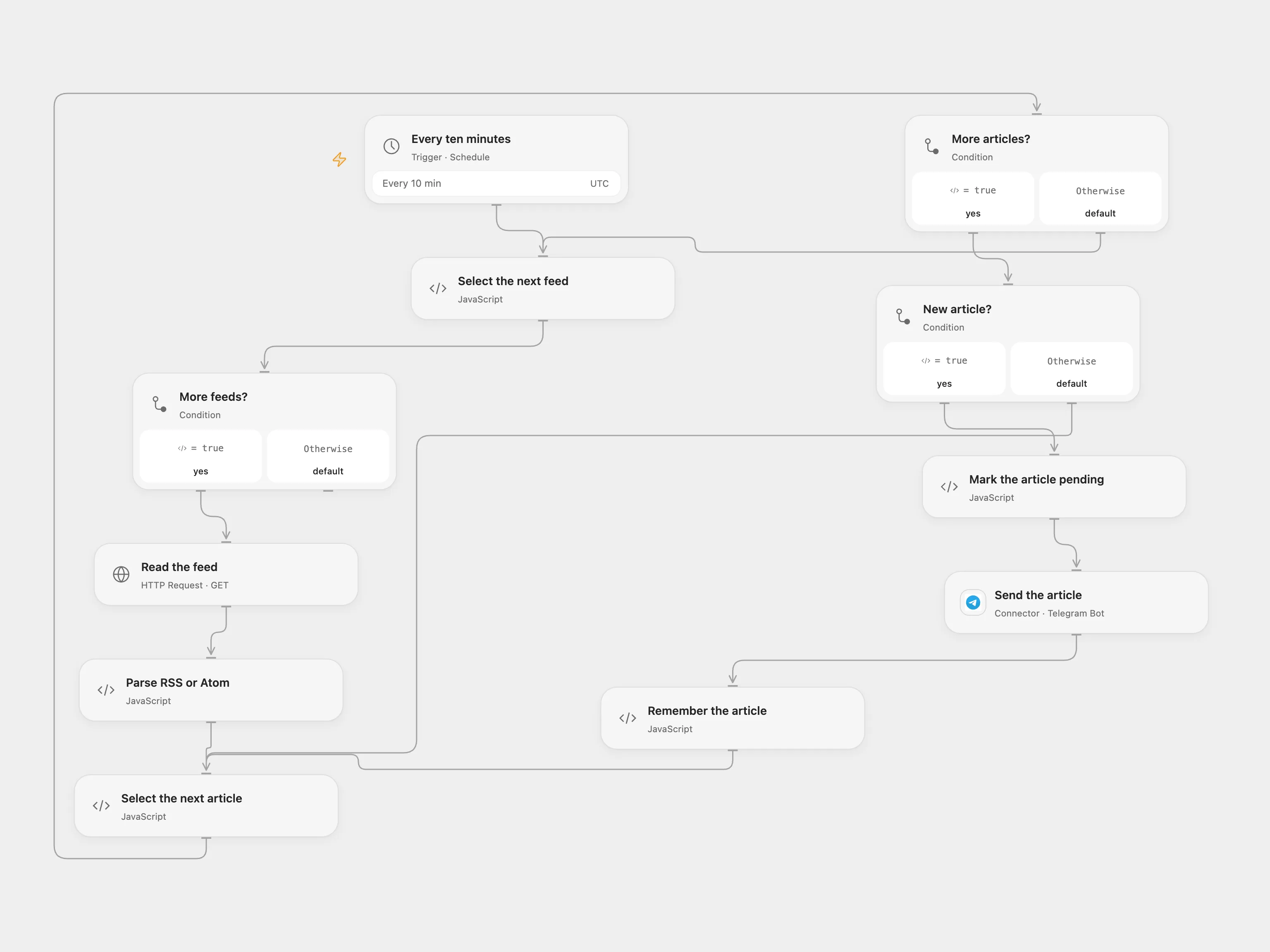
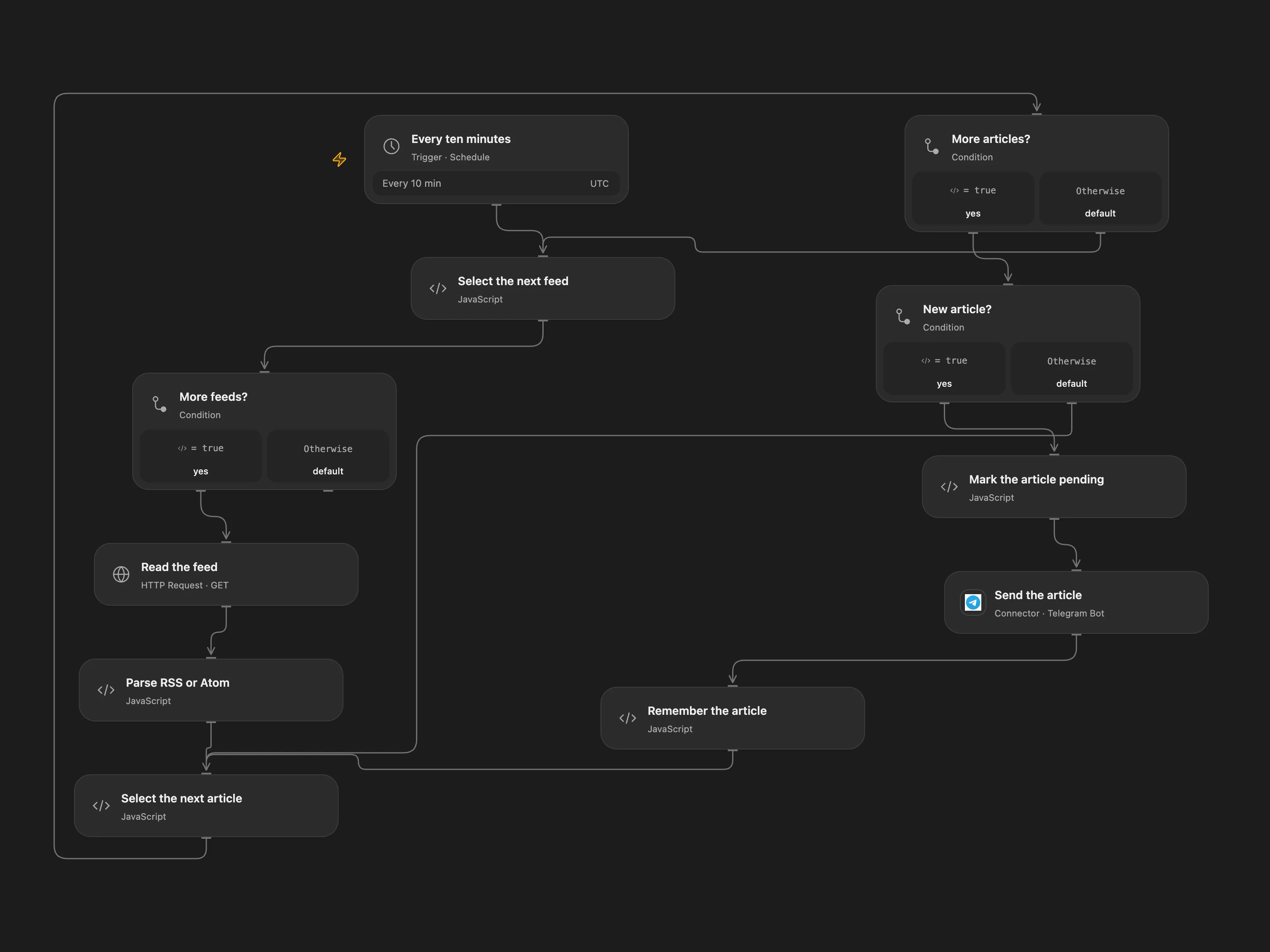
Read multiple feeds and route new links to Telegram chats.
Setup
Configure the feed URLs in Select the next feed, connect Telegram, and set the three chat IDs in Select the next article. Enable persistent State and prevent overlapping runs. Replace HTTP feeds with HTTPS endpoints where available; HTTP feeds can be modified in transit.
Behavior
Every ten minutes, each feed is read in order. Links containing techcommunity.microsoft.com go to M365. Other titles matching the source security keywords go to Security; the rest go to IT. Each message contains the title and link. The first run sends every entry returned. A feed URL and article link identify an item, avoiding the source’s timestamp collisions. Feed contents and accumulated State must fit runtime limits.
A feed or send error stops the run; earlier sends remain. Inspect Telegram before resolving a pending article. In Open Flow enter the exact pending key shown in the error in Select the next article → acknowledgeKey, run once, then clear it. This treats it as handled. No uncertain send is automatically replayed.
In n8n
In n8n configure the RSS Source list, Telegram credentials and chat IDs, and a Data Table with text columns item_key and status selected in all four checkpoint nodes. In n8n inspect pending Data Table rows and the destination, then mark a row sent if delivered or remove it only when a resend is safe.
Inspiration & credits
Changes to the source
- Use feed URL and link for deduplication instead of timestamps. Reserve each item before sending and record confirmation afterward.
- Preserve the source’s feed order, ten-minute schedule and destination rules.
Adapted from RSS feeds routed to Telegram chats in Zie619/n8n-workflows. The source export does not identify a separate template author or license.
The collection’s MIT notice is pinned at a later revision. This is the collection notice at that revision; it does not establish a separate original template author’s license. Our changes are listed above; see repository licensing.
MIT License
Copyright (c) 2025 Zie619
Permission is hereby granted, free of charge, to any person obtaining a copy of this software and associated documentation files (the “Software”), to deal in the Software without restriction, including without limitation the rights to use, copy, modify, merge, publish, distribute, sublicense, and/or sell copies of the Software, and to permit persons to whom the Software is furnished to do so, subject to the following conditions:
The above copyright notice and this permission notice shall be included in all copies or substantial portions of the Software.
THE SOFTWARE IS PROVIDED “AS IS”, WITHOUT WARRANTY OF ANY KIND, EXPRESS OR IMPLIED, INCLUDING BUT NOT LIMITED TO THE WARRANTIES OF MERCHANTABILITY, FITNESS FOR A PARTICULAR PURPOSE AND NONINFRINGEMENT. IN NO EVENT SHALL THE AUTHORS OR COPYRIGHT HOLDERS BE LIABLE FOR ANY CLAIM, DAMAGES OR OTHER LIABILITY, WHETHER IN AN ACTION OF CONTRACT, TORT OR OTHERWISE, ARISING FROM, OUT OF OR IN CONNECTION WITH THE SOFTWARE OR THE USE OR OTHER DEALINGS IN THE SOFTWARE.
Open Flow bundles fast-xml-parser and its dependencies under MIT; their notices are included in the workflow code.