On this page
If you’re comparing Open Flow with Dify (https://dify.ai/), you’re comparing two different architectural philosophies. Dify is built as an LLM app and Agent Builder for chatbots, RAG pipelines, and canvas-assembled agents. Open Flow deliberately avoids building a Dify-style Agent Builder—focusing instead on deterministic workflow execution, 1,700+ SaaS integrations, and CLI/MCP authoring so native coding agents like Claude Code and Codex can drive reliable automation.
App integrations and tools
Dify focuses on model providers, vector databases, and chat plugins. Open Flow is built as a full integration layer across business systems.
| App connections | Open Flow | Dify |
|---|---|---|
| Built-in integrations | 1,700+ apps and services, 20,000+ ready-to-use tools | Small plugin catalog only, oriented around RAG and chat tools |
| Community & maintenance | OpenConnector is community-contributed and maintained by the official team | Marketplace plugins are maintained separately by third-party authors |
| Paid AI & data services | One OOMOL account for multiple paid AI and data services, with no separate provider signups | Requires configuring separate API keys and accounts for every external model or tool |
| Service billing | Pay for what you use, unified in one account | Separate billing across every third-party model and tool provider |
| Custom APIs & schemas | Native HTTP Request and OpenAPI nodes plus TypeScript/Python code nodes | Basic HTTP request node and custom tool schemas, without full SaaS OAuth governance |
When an automation needs to read Gmail, update HubSpot, post to Slack, and log to Google Sheets with managed OAuth credentials, Open Flow handles the entire integration lifecycle out of the box.
Browse Open Flow’s apps and toolsBuilding and editing workflows
Open Flow treats workflows as deterministic pipelines with bounded AI steps, rather than asking a visual canvas to simulate an autonomous agent loop. For the full engineering rationale, see Why Open Flow Doesn’t Build a Dify / Coze-Style Agent Builder.
| Building and editing | Open Flow | Dify |
|---|---|---|
| Core philosophy | Deterministic workflows + external native agents via CLI and MCP | Canvas-built LLM apps and Agent Builder loops |
| Typed I/O | Typed inputs and outputs for static checks, testing, and direct agent inspection without wasting tokens on sample payloads | Visual variable picker over loosely typed node outputs; lacks end-to-end static type checking across workflow graphs |
| Flow control & triggers | Cron schedules, webhooks, polling, branches, loops, and human-in-the-loop approvals | Primarily chat/API-triggered flows; lacks native polling triggers and approval pause nodes |
| AI tasks | LLM and bounded Agent nodes, plus JEV decision nodes to classify, assess, and score in one call | Prompt/LLM/Agent nodes without a dedicated single-call JEV decision node |
| CLI & MCP authoring | Designed for agent editing, with node inspection, targeted edits, atomic updates, and conflict checks | Web UI and REST API only; no developer CLI for atomic workflow graph editing |
| Version control | Built-in revision history, published versions, and rollback | Basic app publishing snapshots without Git-friendly local workflow files |
Instead of debugging context rot inside a low-code Agent Builder, Open Flow keeps reasoning in your native agent harness (Claude Code, Codex) and executes repeatable side effects through deterministic, typed workflows that can be statically checked and tested.
Example workflow: email classification and logging
Here is a practical deterministic workflow for triaging incoming emails:
- Poll or trigger on new unread emails from Gmail.
- Classify each email with an AI Decision node and generate a one-line summary.
- Append the date, sender, subject, category, and summary to Google Sheets.
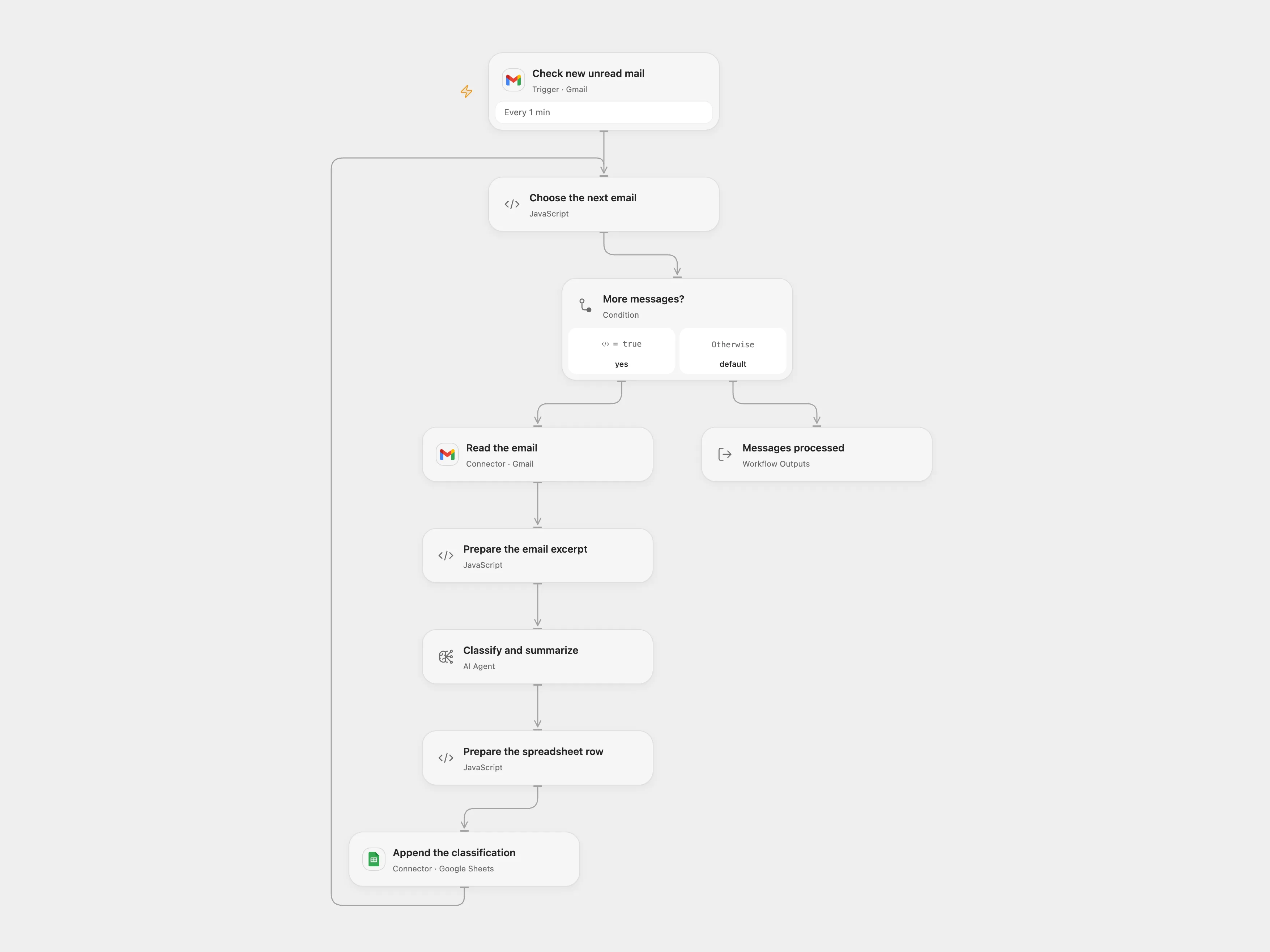
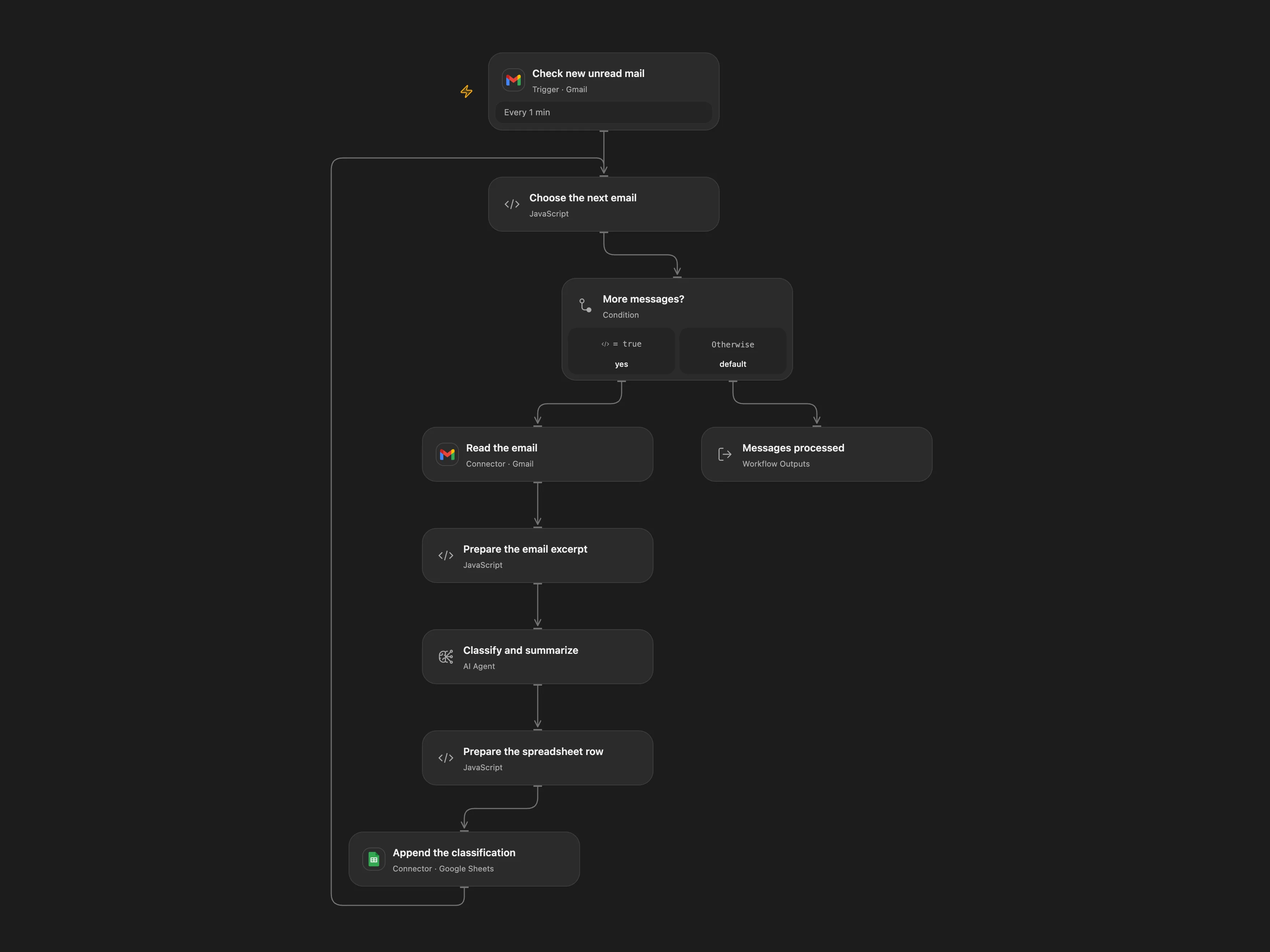
The email classification workflow in Open Flow—deterministic triggers, bounded AI classification, and managed SaaS connectors.
This kind of background automation relies on scheduled inbox polling, managed OAuth tokens, and reliable spreadsheet writes—capabilities that sit outside a chat-centric RAG builder.
View template files and setup instructionsSelf-hosting and data control
Both platforms are open-source and support Docker deployment, yet their operational footprint and connector story differ.
| Self-hosting | Open Flow | Dify |
|---|---|---|
| Deployment | Open-source and lightweight Docker deployment | Open-source Docker stack requiring PostgreSQL, Redis, and vector storage |
| Custom LLMs | Set your own model endpoint and API key, including local and OpenAI-compatible models | Supports cloud and local models (e.g., Ollama) |
| Workflow portability | Open, Git-friendly workflow files | DSL exports tied to Dify’s app schema |
| Official integration services | Self-hosted instances can still use OOMOL’s hosted services, billed by usage | Self-hosted instances cannot use a unified hosted SaaS connector service |
Even when self-hosting Open Flow on your own infrastructure, you can still use OOMOL’s hosted connectors on a pay-as-you-go basis—so you don’t have to register and maintain OAuth apps for every SaaS provider yourself.
Cloud hosting and pricing
Open Flow offers a Free plan with monthly allowances and a $15.90/month Starter plan. Dify Cloud Professional starts around $59/month.
| Cloud hosting | Open Flow | Dify Cloud |
|---|---|---|
| Free option | Free plan with monthly allowances for real workflows | Sandbox tier only with tight message/app limits |
| Entry-level paid plan | $15.90/month | Professional starts around $59/month (Team ~$159/month) |
| Billing model | Monthly allowances, then pay for actual usage | Fixed subscription tiers with message credit caps |
Open Flow gives you production workflow infrastructure at a fraction of Dify Cloud’s entry cost, without locking you into a chat-centric Agent Builder.