On this page
If you’re considering Open Flow, this comparison will help you decide whether it can handle the tasks you have in mind. You’ll see how it compares with n8n (https://n8n.io/) in practice, what you’ll need to get started, and what it costs to run your workflows.
App integrations and tools
Both platforms have ready-made integrations for Gmail, Slack, Notion, HubSpot, Google Sheets, and other common services.
| App connections | Open Flow | n8n |
|---|---|---|
| Built-in integrations | 1,700+ apps and services, 20,000+ ready-to-use tools | 1,000+ built-in integrations |
| Community integrations | The community contributes to OpenConnector; the official team maintains the integrations | Third-party nodes are maintained by their authors; updates and compatibility vary by project |
| Paid services | One OOMOL account for multiple paid AI and data services, with no separate provider signups | Some services available directly through Cloud; others require a provider account |
| Service billing | Pay for what you use, billed through one account with no separate subscriptions | Cloud credits can only be topped up on a paid plan; other services bill separately |
| Custom services | HTTP requests | HTTP requests |
Open Flow includes actions for logging email classifications in a spreadsheet and syncing sales inquiries to a CRM. Connect your accounts to use those actions in a workflow.
Browse Open Flow’s apps and toolsBuilding and editing workflows
Open Flow supports most of the automation capabilities commonly used in n8n, including schedules, conditional branches, data processing, app actions, and AI tasks.
| Building and editing | Open Flow | n8n |
|---|---|---|
| Typed I/O | Typed inputs and outputs for static checks, testing, and direct agent inspection without wasting tokens on sample payloads | Untyped JSON payloads built for manual low-code use; requires running a node first and picking JSON paths from the output |
| AI tasks | LLM and Agent nodes, plus JEV decision nodes to classify, assess, and score input in one call | LLM, Agent, and text classifier nodes; no built-in JEV node |
| Workflow format | Open Flow format; agents can convert n8n workflows through the CLI | n8n format |
| CLI authoring | Designed for agent editing, with node inspection, targeted edits, atomic updates, and conflict checks | Read and write workflow JSON through the API |
| MCP authoring | The same authoring tools as the CLI, for creating, editing, validating, and testing workflows | Create, edit, and run workflows |
For example, an AI Decision node can classify a support email and assess its urgency in one call, while a Condition node routes the notification based on those results. Because every node defines typed inputs and outputs, wiring mistakes show up statically before a run and workflows are straightforward to test. Coding agents can read those schemas directly through the CLI or MCP instead of executing an API first to inspect raw JSON paths, saving both setup time and tokens.
Example workflow: email classification and logging
This email classification template comes in Open Flow and n8n versions. Both handle the same task:
- Read new unread emails from Gmail.
- Classify each email with AI and generate a one-line summary.
- Append the date, sender, subject, category, and summary to Google Sheets.
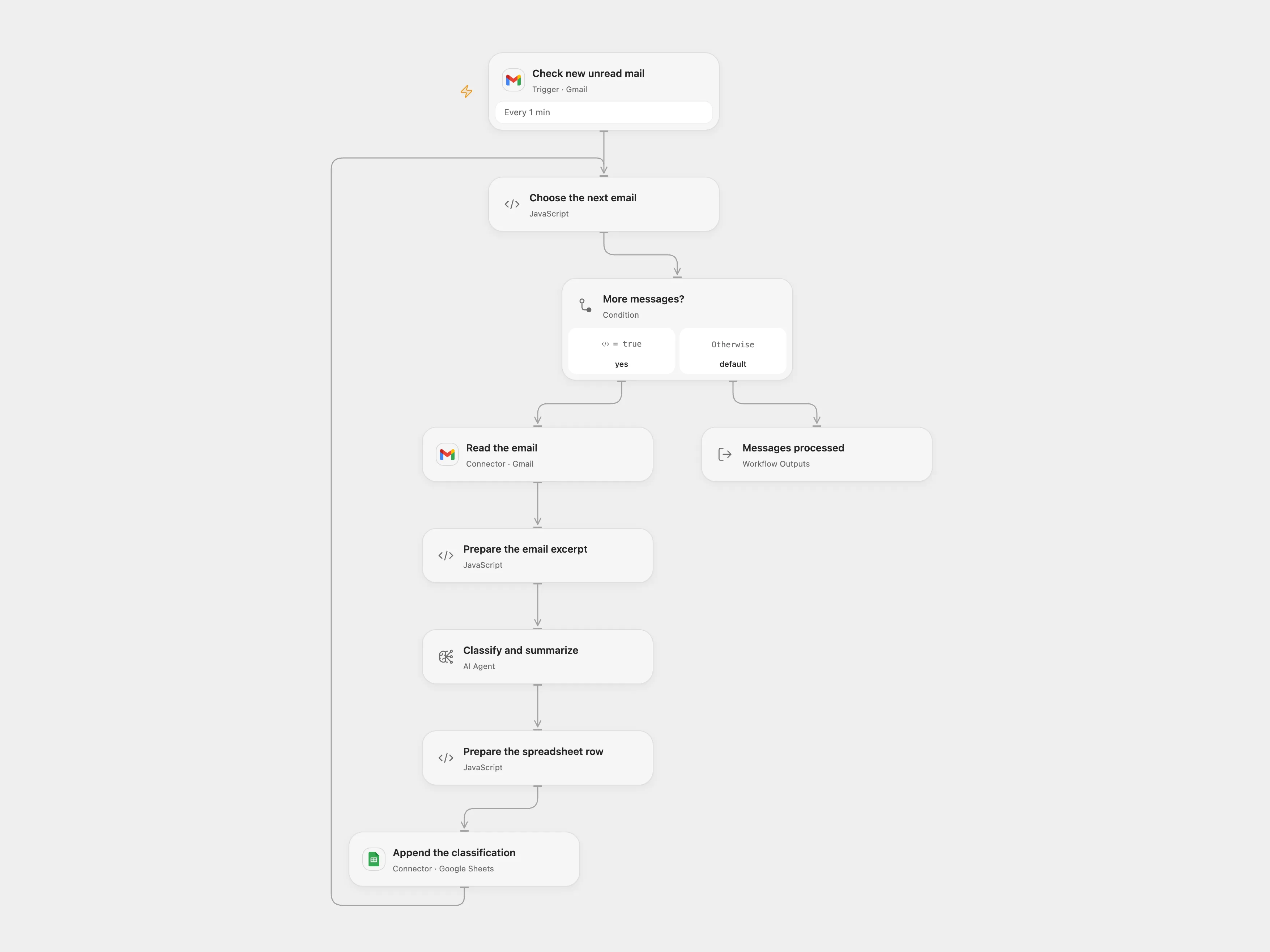
The email classification workflow in Open Flow. The template page includes the n8n version and setup instructions.
After importing, connect Gmail and Google Sheets, configure the AI model, and choose the destination spreadsheet. Both workflow JSON files and setup instructions are available on the template page.
View template files and setup instructionsSelf-hosting
Both platforms can run on your own servers. You manage the servers, backups, and upgrades.
| Self-hosting | Open Flow | n8n Community Edition |
|---|---|---|
| Core features | Visual editor, schedules, webhooks, and code execution | Visual editor, schedules, webhooks, and code execution |
| Custom LLMs | Set your own model endpoint and API key; supports OpenAI-compatible APIs | Bring your own API key; supports cloud and local models |
| Workflow history | Built-in revision history, published versions, and rollback | Only the last 24 hours; full history requires Enterprise |
| Official integration services | Works with OOMOL’s hosted services, billed by usage | Cloud service credits unavailable for self-hosted n8n |
A self-hosted Open Flow instance can use OOMOL’s app integrations and paid tools without deploying and maintaining OpenConnector yourself. The integration service and LLM are configured independently, so you can use hosted integrations with your own model endpoint.
Cloud hosting and pricing
Open Flow has a free plan with monthly allowances. n8n Cloud offers a trial, then requires a paid subscription.
| Cloud hosting | Open Flow | n8n Cloud |
|---|---|---|
| Free option | Free plan with monthly allowances | Trial; paid plan required afterward |
| Entry-level monthly price | $15.90/month | €24/month |
| Billing | Monthly allowances, then pay for actual usage | Subscription tiers based on workflow executions |
Open Flow is free to start, with a lower entry-level monthly price. Once you’ve used your free allowance, you can pay for extra usage without adding a monthly subscription just to keep an occasional workflow running.