On this page
If you’re comparing Open Flow with Langflow (https://www.langflow.org/), the distinction is between a production automation engine and a LangChain prototyping canvas. Langflow wraps Python, LangChain, and LangGraph components into a visual graph for experimenting with prompts and RAG chains. Open Flow deliberately avoids building heavy AI-chain frameworks—focusing instead on deterministic workflows, 1,700+ managed SaaS connectors, and CLI/MCP authoring so native coding agents can drive real business operations.
App integrations and tools
Langflow’s components center on Python libraries, vector stores, and LLM wrappers. Open Flow gives you a complete SaaS integration layer with managed OAuth and unified billing.
| App connections | Open Flow | Langflow |
|---|---|---|
| Built-in integrations | 1,700+ apps and services, 20,000+ ready-to-use tools | LangChain/Python components only; lacks a broad managed SaaS OAuth connector catalog |
| Community & maintenance | OpenConnector is community-contributed and maintained by the official team | Custom integrations require writing and maintaining Python component wrappers |
| Paid AI & data services | One OOMOL account for multiple paid AI and data services, with no separate signups | Requires configuring separate API keys and accounts for every external service |
| Service billing | Pay for what you use, unified in one account | Separate billing across every third-party model, vector store, and API provider |
| Custom APIs & schemas | Native HTTP Request and OpenAPI nodes plus TypeScript/Python code nodes | Relies on custom Python components or generic API request blocks |
When a workflow needs to read Gmail, update HubSpot, notify Slack, and log to Google Sheets with managed OAuth tokens, Open Flow handles those integrations out of the box rather than asking you to write Python wrappers.
Browse Open Flow’s apps and toolsBuilding and editing workflows
Open Flow is built for deterministic, auditable automation rather than wrapping third-party LangChain abstractions around models. For the full engineering rationale, see Why Open Flow Doesn’t Build a Dify / Coze-Style Agent Builder.
| Building and editing | Open Flow | Langflow |
|---|---|---|
| Core philosophy | Deterministic workflows + external native agents via CLI and MCP | Visual wrapper over LangChain / LangGraph chains |
| Typed I/O | Typed inputs and outputs for static checks, testing, and direct agent inspection without wasting tokens on sample payloads | Loose component port types tied to Python runtime objects; lacks unified static validation for agent graph editing |
| Flow control & triggers | Cron schedules, webhooks, polling, branches, loops, and human-in-the-loop approvals | Request/response chain execution only; lacks built-in cron, polling, and approval pause nodes |
| AI tasks | LLM and bounded Agent nodes, plus JEV decision nodes to classify, assess, and score in one call | Prompt and chain nodes tied to LangChain abstractions, with no single-call JEV decision node |
| CLI & MCP authoring | Designed for agent editing, with node inspection, targeted edits, atomic updates, and conflict checks | CLI only starts the local server (langflow run); no atomic graph-editing CLI for agents |
| Version control | Built-in revision history, published versions, and rollback | JSON export/import only, with no built-in published version rollback |
Instead of maintaining brittle chain wrappers that model upgrades quickly outgrow, Open Flow lets native agents like Claude Code and Codex inspect typed node schemas, catch wiring errors statically, and test deterministic workflows directly via CLI and MCP.
Example workflow: email classification and logging
Here is a practical production workflow for triaging incoming emails:
- Poll or trigger on new unread emails from Gmail.
- Classify each email with an AI Decision node and generate a one-line summary.
- Append the date, sender, subject, category, and summary to Google Sheets.
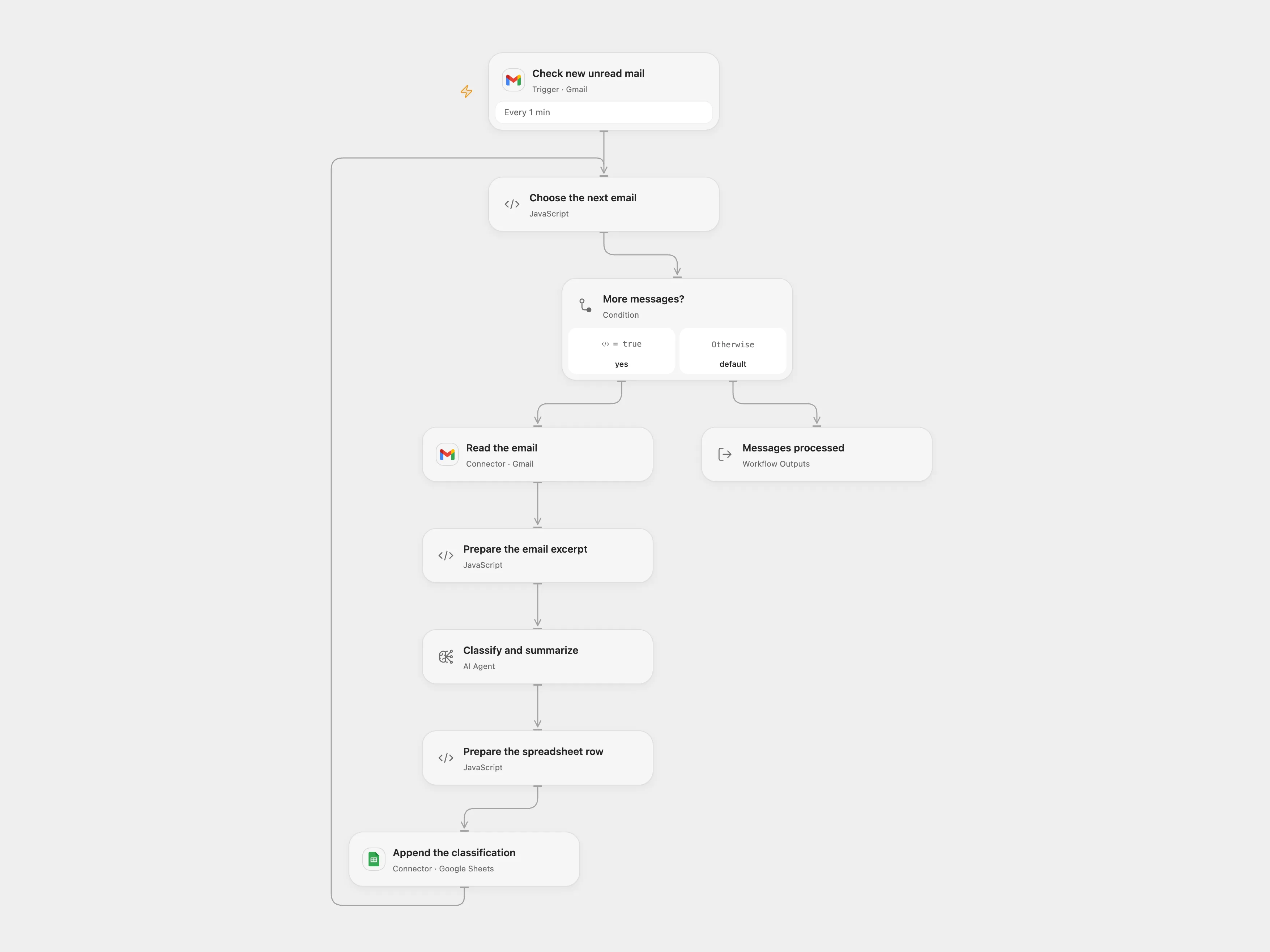
The email classification workflow in Open Flow—scheduled triggers, deterministic branching, and managed SaaS connectors.
Running this reliably requires scheduled polling, managed OAuth token refreshes, and structured spreadsheet writes—production primitives that sit outside a LangChain prototyping UI.
View template files and setup instructionsSelf-hosting and data control
Both platforms are open-source and self-hostable, yet Open Flow pairs self-hosting with optional managed connectors.
| Self-hosting | Open Flow | Langflow |
|---|---|---|
| Deployment | Open-source and self-hostable with Docker on your own infrastructure | Open-source Python/Docker runtime (MIT) |
| Custom LLMs | Set your own model endpoint and API key, including local and OpenAI-compatible models | Supports cloud and local models via LangChain providers |
| Workflow portability | Standard open workflow files with built-in revision history | JSON flow exports tied to Langflow’s Python component versions |
| Official integration services | Self-hosted instances can still use OOMOL’s hosted services, billed by usage | Self-hosted instances have no unified hosted SaaS connector service |
Even when self-hosting Open Flow on your own servers, you can still use OOMOL’s hosted connectors on a pay-as-you-go basis—saving your team from maintaining OAuth apps for dozens of SaaS APIs.
Cloud hosting and pricing
Open Flow offers both open-source self-hosting and a turnkey managed cloud starting with a Free plan and a $15.90/month Starter plan. Langflow’s managed cloud scales through custom DataStax enterprise tiers.
| Cloud hosting | Open Flow | Langflow |
|---|---|---|
| Free option | Free plan with monthly allowances, full SaaS connectors, and webhooks | Primarily self-managed open source; no turnkey hosted SaaS connector tier |
| Entry-level paid plan | $15.90/month | Managed cloud relies on custom/enterprise DataStax tiering |
| Billing model | Monthly allowances, then pay for actual usage | Infrastructure/enterprise contracts on managed cloud |
Open Flow gives you a complete, turnkey workflow engine—from scheduled triggers and managed OAuth to predictable cloud hosting and Docker self-hosting.