On this page
If you’re comparing Open Flow with Make (https://www.make.com/), the core difference is engineering control. Make is built around a cloud-only visual router where every module execution burns credits and your flows stay locked on Make’s servers. Open Flow combines deterministic orchestration, native AI decision nodes, agent-editable workflow files via CLI and MCP, and optional self-hosting.
App integrations and tools
Both platforms connect to common SaaS apps like Gmail, Slack, Notion, HubSpot, and Google Sheets, yet their connector architecture and billing models work very differently.
| App connections | Open Flow | Make |
|---|---|---|
| Built-in integrations | 1,700+ apps and services, 20,000+ ready-to-use tools | Cloud SaaS modules only; custom apps require proprietary Make app schemas |
| Community & maintenance | OpenConnector is community-contributed and maintained by the official team | Third-party or custom modules are maintained separately by their authors |
| Paid AI & data services | One OOMOL account for multiple paid AI and data services, with no separate provider signups | Acts only as a pass-through; you still manage separate provider accounts and API keys |
| Service billing | Pay for what you use, unified in one account | Separate subscriptions for external AI/data APIs on top of Make’s module credits |
| Custom APIs & schemas | Native HTTP Request and OpenAPI nodes for calling any REST or OpenAPI service | Generic HTTP module only, without a dedicated OpenAPI schema node |
In Open Flow, you can combine SaaS connectors, OpenAPI endpoints, and paid AI services under one account—without juggling external API keys or paying twice for every step.
Browse Open Flow’s apps and toolsBuilding and editing workflows
Open Flow treats workflows as deterministic, version-controlled engineering artifacts that both humans and coding agents can edit. Make keeps your scenarios inside a browser-only canvas.
| Building and editing | Open Flow | Make |
|---|---|---|
| Typed I/O | Typed inputs and outputs for static checks, testing, and direct agent inspection without wasting tokens on sample payloads | Untyped runtime data mapping; requires running modules first to inspect sample fields in the visual mapper |
| Flow control | Deterministic branches, loops, sub-workflows, error handlers, and human-in-the-loop approvals | Visual routers and iterators, with no native pause-for-approval node |
| AI tasks | LLM and Agent nodes, plus JEV decision nodes to classify, assess, and score input in one call | Separate AI modules only, where each module call consumes credits |
| CLI & MCP authoring | Designed for agent editing, with node inspection, targeted edits, atomic updates, and conflict checks | Make MCP only exposes scenarios as remote tools; it cannot edit local workflow graphs |
| Version control | Built-in revision history, published versions, and rollback | Limited scenario history; incomplete executions and variables require higher tiers |
| Workflow portability | Open, Git-friendly workflow files | Proprietary JSON blueprints tied to Make’s cloud |
Instead of building a brittle canvas-only Agent Builder, Open Flow keeps execution deterministic and lets frontier coding agents like Claude Code and Codex inspect, edit, and validate typed workflows through CLI and MCP. Because every node exposes typed inputs and outputs, type mismatches are caught statically and workflows are straightforward to test, without running modules first just to map sample fields.
Example workflow: email classification and logging
Here is a practical workflow for triaging incoming emails:
- Read new unread emails from Gmail.
- Classify each email with AI and generate a one-line summary.
- Append the date, sender, subject, category, and summary to Google Sheets.
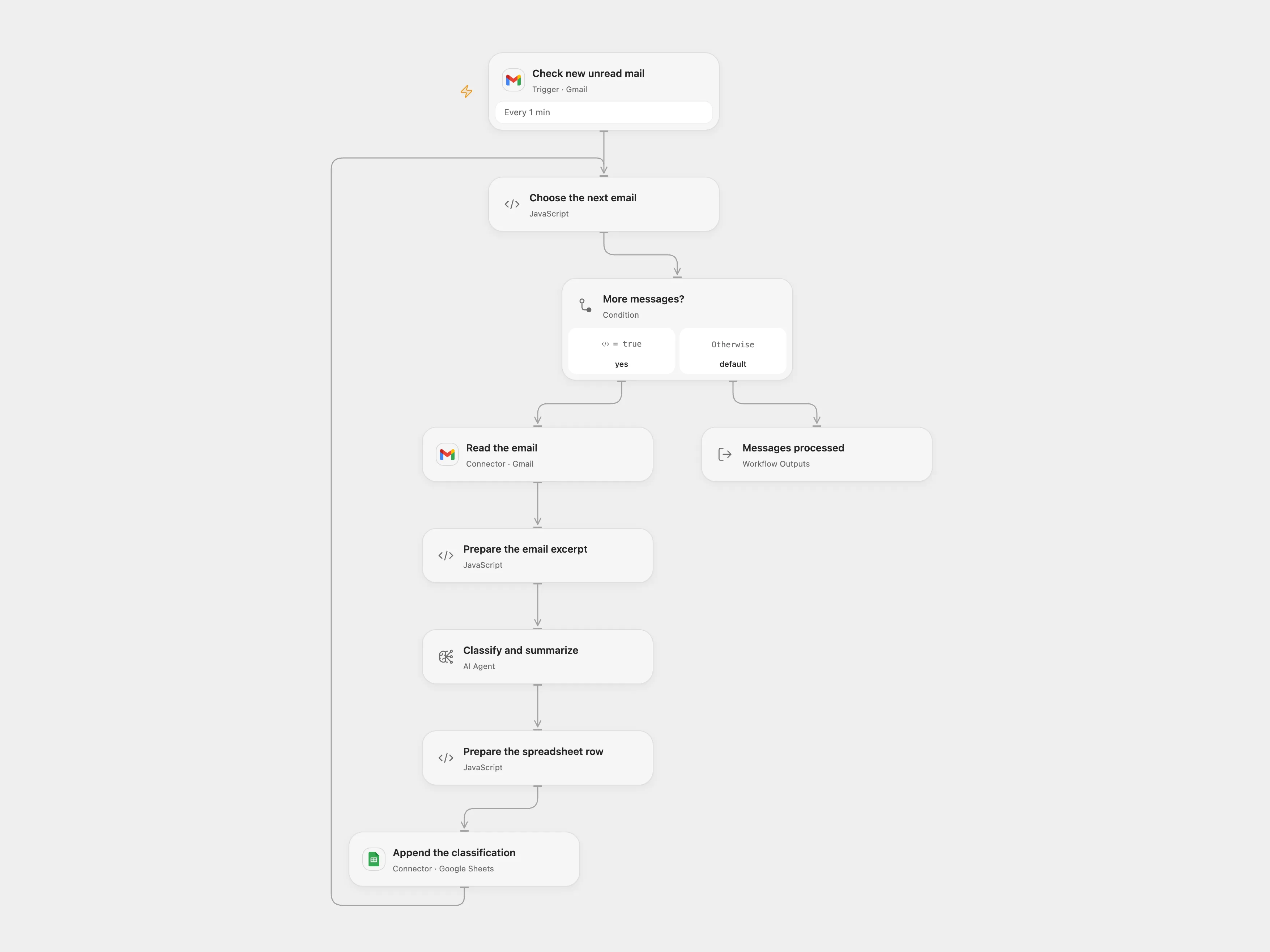
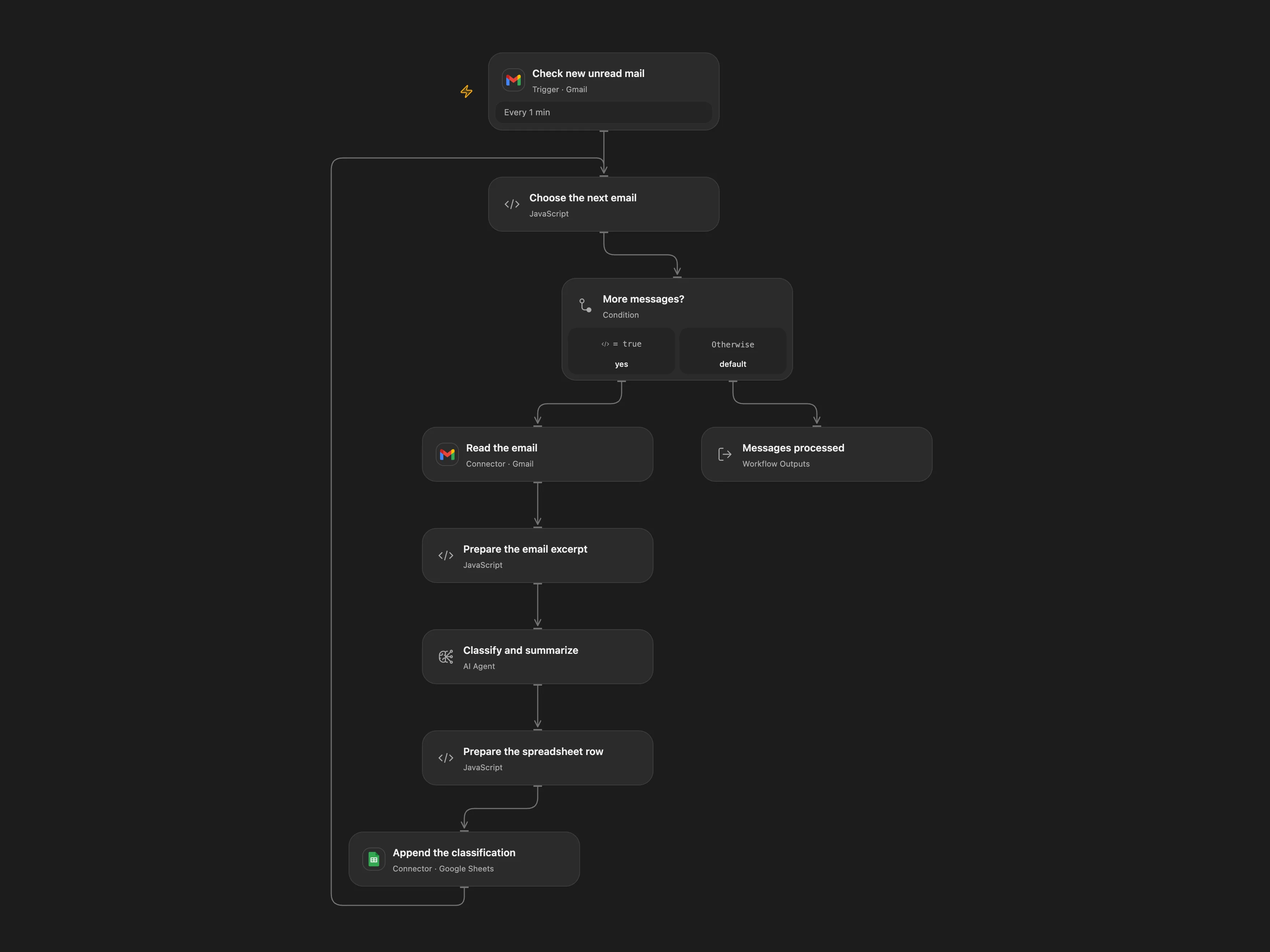
The email classification workflow in Open Flow, built with structured nodes, revision history, and agent-editable JSON.
In Open Flow, you can import this template, connect Gmail and Google Sheets, configure any OpenAI-compatible model endpoint, and track every change with built-in revision history.
View template files and setup instructionsSelf-hosting and data control
For teams with strict data governance, compliance, or latency requirements, deployment options draw a hard line.
| Self-hosting | Open Flow | Make |
|---|---|---|
| Deployment | Open-source and self-hostable with Docker on your own infrastructure | Cloud-hosted SaaS only; no self-hosted edition or Docker image |
| Custom LLMs | Set your own model endpoint and API key, including local and OpenAI-compatible models | Cloud-only integrations; no local model runtime |
| Data & logs | Runs inside your own network when self-hosted | All payloads and execution logs stay on Make’s servers |
| Official integration services | Self-hosted instances can still use OOMOL’s hosted services, billed by usage | Not applicable—everything must run on Make’s cloud |
Make runs exclusively in Make’s cloud. Open Flow lets you start in the cloud and move to self-hosting whenever your infrastructure requires it—while still using OOMOL’s hosted connectors if you don’t want to maintain OAuth apps yourself.
Cloud hosting and pricing
Open Flow separates workflow capability from usage billing. Make meters every module execution and gates features like 1-minute intervals and custom variables behind paid tiers.
| Cloud hosting | Open Flow | Make |
|---|---|---|
| Free option | Free plan with monthly allowances, full branching, AI nodes, and webhooks | Only 1,000 credits/month and a 15-minute minimum scheduling interval |
| Entry-level monthly price | $15.90/month | Core starts around $9–$12/month for 10,000 credits, but custom variables and priority execution require Pro |
| Billing & loops | Monthly allowances, then pay for actual usage | Every module inside a loop or iterator burns extra credits on every item |
Open Flow scales cleanly as your workflows grow. You don’t have to worry about iterators multiplying module credits or upgrading tiers just to unlock variables and error handling.