Approval
Require an explicit approve or reject decision before selecting the corresponding branch.
Use Approval when a human decision determines which work may proceed. Put the operation requiring approval on the approve path; a prompt or canvas note alone does not enforce that dependency.
Configure the request
{
  "op": "node.add", "as": "review", "type": "approval", "name": "Review reply",
  "prompt": "Approve the proposed customer reply?",
  "inputs": {
    "reply": { "kind": "value", "value": "Your replacement is ready to ship." }
  }
}
Named inputs provide the context shown with the approval request. Use config.inputs for additional business constraints where necessary.
Branches and outputs
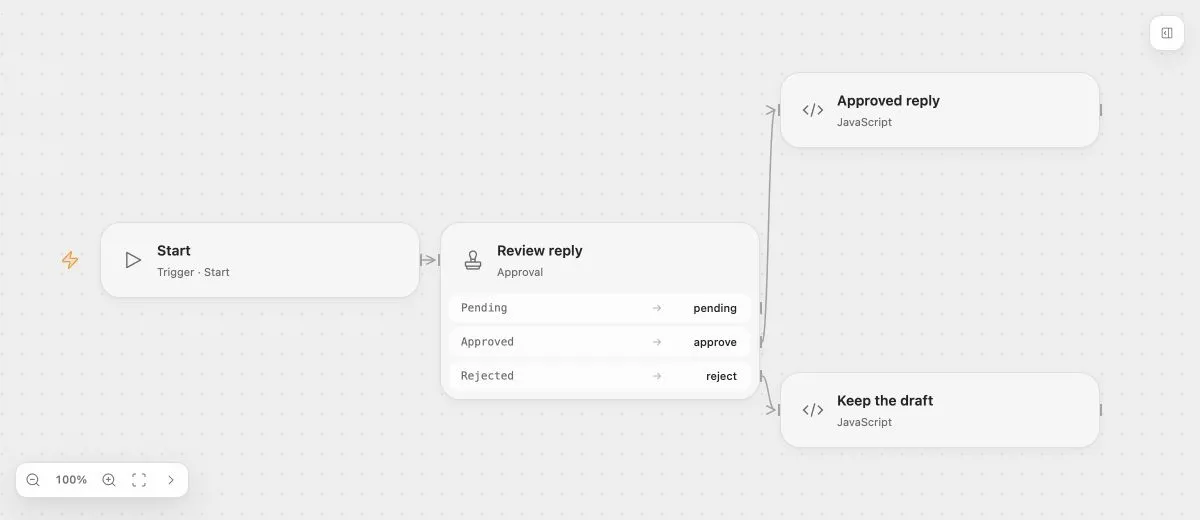
pending can notify the reviewer once the decision is durably registered. approve and reject select the corresponding continuation paths. Their output objects contain the accepted decision, resolution time, optional comment, and context inputs.
{ "op": "edge.connect", "source": "$review", "branch": "approve", "target": "$send" }The target node above must exist earlier in the edit batch or be an observed node reference. Connect rejection separately when it needs to record or revise the work.
- Input
- The proposed reply is "Your replacement is ready to ship."
- Expected result
- Approve continues to Approved reply; reject continues to Keep the draft.
- Before running
- An Open Flow deployment is needed to execute or import this example. The preview itself runs offline.
Decision ownership
The Run owns the pending decision. The first accepted action wins across all supported entry points. A repeated submission does not overwrite the choice or execute the branch a second time.
Public action URLs authorize only their specified Wait and supported decision. They do not provide a deployment login or general Flow access. Notifications must deliver them to the intended reviewer through the deployment’s authorized mechanism.
Limits
Approval is manual; it has no automatic timeout-to-approval option. It also has no ordinary Task retry or onError handling. Use Wait for a pause that can continue automatically at a configured time.